Email Marketing Tip (1): Clean up your mailing lists after every email campaign
Lennart DeTaeye
As a marketer, you always put a lot of effort into crafting the perfect email. You make sure that both the content and design of your email are just right. How frustrating Isn't it the case that—after sending your email—you notice that quite a few emails could not be delivered to your recipients' inboxes (high bounce rate)?
One of the most important steps for reducing the bounce rate is to Continuously maintaining your marketing lists. If you clean up your marketing lists after every email campaign based on all undelivered emails (bounces), then you're already well on your way to a clean mailing list.
Example 1
A hard bounce is caused by an invalid or non-existent email address. You must immediately correct or remove a hard bounce from your marketing list. First, try to determine why the email address is incorrect.
For example, check:
whether the recipient's name is spelled correctly
Check to see if the domain name contains any errors—for example, it might say ".con" instead of ".com" or "@gmial" instead of "@gmail"
whether the person in question still works for the company. You can usually check this on LinkedIn or Trendstop (http://trendstop.knack.be/nl/home.aspx)
whether the company still exists
…
If you can't correct the email address, you should definitely remove it from your marketing list. That way, it will no longer affect your statistics (open ratio, click-through rate, …) negatively.
Example 2
A soft bounce is the result of a temporary issue with a valid email address, such as a full inbox or a problem with the recipient's server.
There’s not much you can do about this. This problem probably won’t occur again with the next email. If you notice that the same soft bounces keep occurring after 3 or 4 attempts, it’s best to permanently remove the email address from your marketing list.
Example 3
A soft bounce This can also happen when certain content in your email is blocked by the recipient's spam filter. It's also possible that the recipient's server follows a specific policy that your email does not comply with.
There are a few things you can keep in mind to ensure that your the email doesn't end up in the spam filter.
Do not use a "no-reply" address; use a valid sender address instead.
Avoid using capital letters, punctuation marks, or typical spam words (free, order now, best price, sale, etc.) in the subject line as much as possible.
Make sure your email includes an easily visible unsubscribe link.
Always send test emails to yourself first, and to your colleagues if necessary.
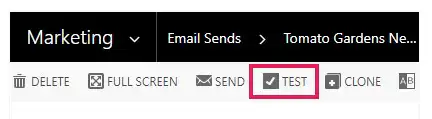
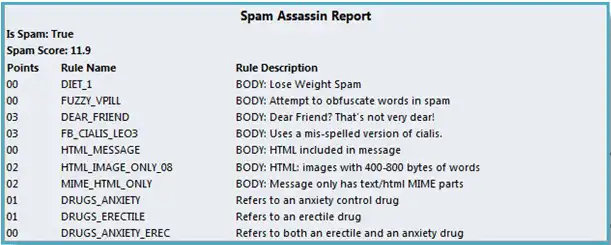
Bonus tip! If you ClickDimensions If you want to use it, you can easily do so via the ‘Test’-button on the ‘Send Email’-record.You will then receive, among other things, a ‘Spam Assassin Report’. This report provides a spam score and shows how likely it is that your email will end up in a spam folder.". If your email has a spam score that is too high, you can visit the SpamAssassin website to find out how to lower it.
Strive for a good balance between text and images. Make sure the text in your email is still readable even without images. If you use images, be sure to include alt and title text in your HTML code so that email programs can understand what the images depict.