

You may be familiar with the problem of outdated or incomplete information in your CRM environment. You may have already experienced how this leads to frustration, wasted money, and lost time. Just think of email campaigns that don’t reach their recipients because of incorrect email addresses, missed sales opportunities because you can’t run analyses based on up-to-date company data, dissatisfied customers because they aren’t addressed by their correct names… and the list goes on.
The ‘Trends Top Plugin for Dynamics 365’ helps you update the data in your Dynamics 365/CRM Online tool and enrich it with data from the Trends Top database.
What is the Trends Top Plugin for Dynamics 365?
Top Trends is a leading provider of business information and web tools for financial analysis, targeted prospecting, geomarketing, and sales management. The Trends Top database contains detailed business data on Belgian companies required to file financial statements. For each company, you’ll find up-to-date information about the company itself (address, phone number, website, date of incorporation), contact persons, key financial figures, and more. To provide customers with affordable access to this comprehensive Trends Top database, Microsoft and Trends Top joined forces. A specific plugin developed which provides you with the latest Trends Top information directly can integrate in Microsoft Dynamics 365/CRM Online. We at Alistar, in turn, provide technical support or additional development as needed.*
How do you use the Trends Top Plugin for Dynamics 365?
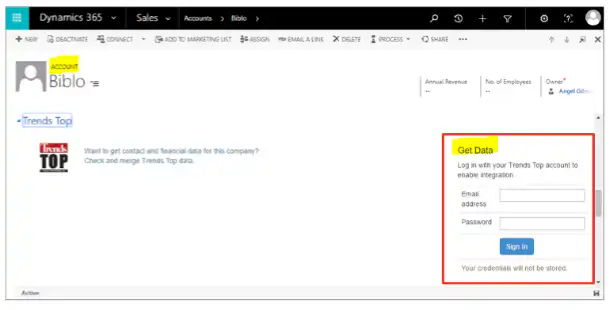
To import data from the Trends Top database, open a specific ‘account’ in Microsoft Dynamics 365/CRM Online. From this account, the system uses the plugin to search for matching companies in Trends Top. You can then use radio buttons and checkboxes Specify which data (such as specific contacts) you want to add to the relevant account in Dynamics 365/CRM Online.
If you have enriched your company data in your Dynamics 365/CRM Online tool with Trends Top information, you can use it to compile marketing lists and create ‘queries‘. For example:
- a query for companies with a specific rating
- a query for companies with a specific revenue for a specific year
What is the cost?
To use the ’Trends Top Plugin for Dynamics 365," you need a Dynamics 365/CRM Online license (Contact us (for more information) and a Trends Top subscription (Contact Trends Top (for more information).
* Technical support and additional development provided by Alistar are billed separately.


