

Update February 7, 2017:
Since the announcement to Dynamics 365 Outlook Add-in When Microsoft considered removing the Dynamics 365 Outlook add-in, it received a great deal of feedback from customers and partners. This feedback highlighted the need for the specific Outlook add-in to continue to exist. Microsoft therefore decided to continue supporting the Dynamics 365 Outlook add-in for future, new versions of Dynamics 365. Customers who upgrade to a newer version of Microsoft Dynamics 365 will have the same Outlook integration experience as in previous versions. However, new features for the Outlook add-in will no longer be developed.
Although Microsoft continues to support the Dynamics 365 Outlook add-in, it encourages its customers to Dynamics 365 App for Outlook to use. This is because the app is based on new ‘Office add-ins’ that are easier to implement and maintain and work on various platforms.
The Microsoft Dynamics 365 Outlook Add-in (also known as “Dynamics 365 for Outlook”) will be discontinued. Microsoft previously announced this: “The legacy Outlook add-in—Dynamics 365 for Outlook—has been deprecated with the July 2017 update for Dynamics 365 (online) and will be removed in a future major release”.
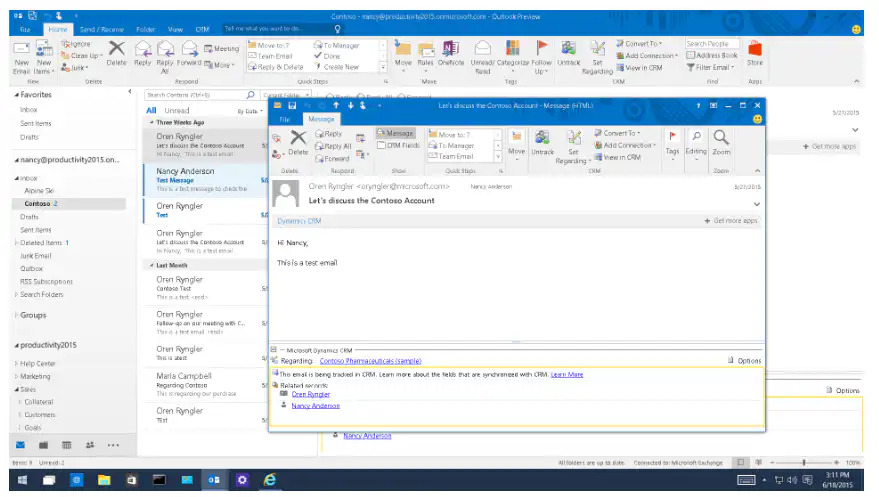
Microsoft Dynamics 365 Outlook add-in is not the same as Dynamics 365 app for Outlook. For more information about the differences, see this blog post where we compare the add-in to the app.
What “deprecated”What does that mean?"
When a Dynamics 365 feature is “deprecated”, this means that the functionality will be removed in the next major update or release of Microsoft Dynamics 365. The Dynamics 365 Outlook add-in will continue to work for the time being and will be fully supported until it is officially removed. However, Microsoft is no longer investing in new features for this specific add-in.
When will the Dynamics 365 Outlook add-in be discontinued?
The diagram below shows how Microsoft plans to support and phase out the Dynamics 365 Outlook add-in. The entire process will be implemented gradually so that users can adapt to this change.
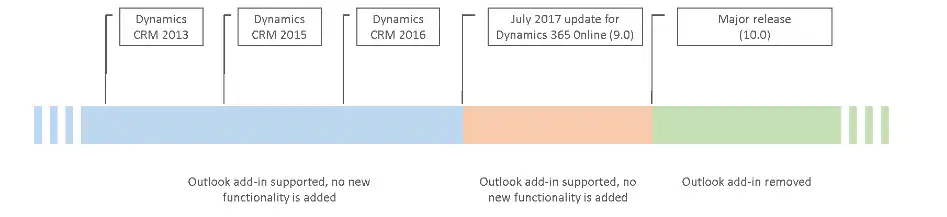
The Dynamics 365 Outlook add-in is permanently deleted at the launch of the Dynamics 365 version 10.0. This is the next major update/release following the release of Dynamics 365 version 9.0 (which is expected to be available to everyone this fall). We cannot yet say with certainty exactly when Dynamics 365 version 10.0 will be released. We will certainly keep you informed. The removal of the Dynamics 365 Outlook add-in is therefore Applies to Dynamics 365 version 10.0 and later updates. Microsoft will continue to support the add-in in versions earlier than version 10.0.
Why is Microsoft doing this?
Although the Dynamics 365 Outlook add-in offers a wide range of features, Microsoft noted that the user experience no longer aligns with customers“ desire to work quickly and contextually. The add-in is based on ”COM add-ins,” which are outdated, run slower, and are only supported in limited versions of Outlook.
In recent years, Microsoft has launched Office specific “Office add-ins” such as the Dynamics 365 App for Outlook. Unlike “COM add-ins,” “Office add-ins” do not require any code to be physically installed on the user’s device or the Outlook client. This ensures that these “Office add-ins” perform better in terms of maintenance and reliability. Furthermore, they are not limited to Outlook on Windows; they also work on the Outlook Web App, Outlook for Mac, and Outlook on mobile devices.
For those reasons, as well as the latest improvements to Dynamics 365 and the Dynamics 365 App for Outlook, Microsoft is convinced that its customers can work much more effectively with the Dynamics 365 App for Outlook.
Dynamics 365 App for Outlook—wherever and whenever you want
With the Dynamics 365 App for Outlook, you can, among other things, view information about contacts and prospects from Dynamics 365 while working in Outlook. Or you can link emails, meetings, and appointments to a record in Dynamics 365.
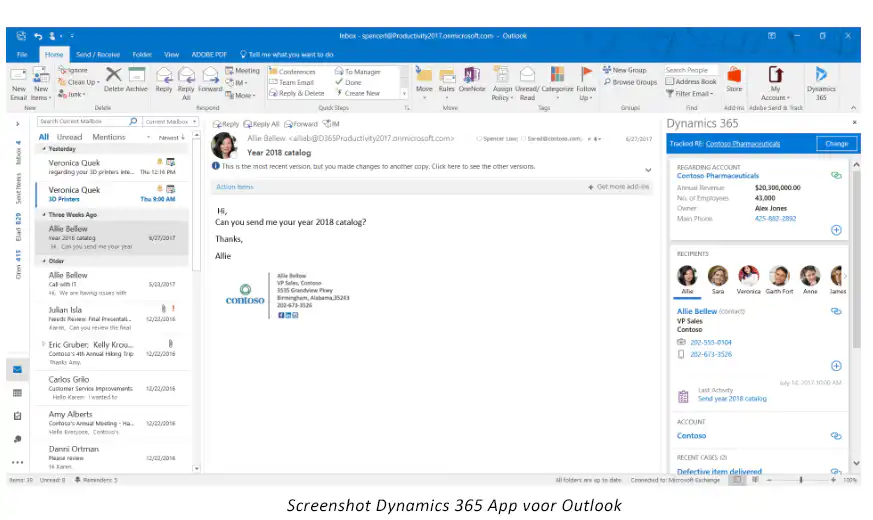
You can use the Dynamics 365 app for Outlook wherever and whenever you want. You don't need to install Outlook software, because you can assign and use the app through the Dynamics 365 admin settings on your desktop, via the web, or on your mobile device.
If your employees are currently using the Dynamics 365 Outlook add-in and you’d like to try out the app as well, you can use the “server-side sync” You can then have some of your colleagues use the add-in and others use the app. However, we do not recommend that a single user use both the add-in and the app at the same time.
* Source for this article: https://blogs.msdn.microsoft.com/crm/2017/08/08/deprecation-of-dynamics-365-for-outlook/


