Customer feedback is essential
We're not telling you anything new when we say that customer feedback is indispensable to improve your products, your services, and—therefore—the customer experience. On the right moment (e.g., a key decision point) the constructive feedback Asking questions can provide a lot of insights. Why exactly did customers choose your product? Or why did they decide not to buy it? Maybe it wasn’t because of the quality of your product, but rather because of a cumbersome ordering process. Or perhaps the customer couldn’t find relevant information about your product quickly enough.
Don't miss the opportunity to respond immediately to all the valuable customer feedback you receive. If you Microsoft Dynamics 365 If you use it, you can quickly and easily collect and analyze customer feedback through the survey module Voice of the Customer (VOC). This module was introduced in the Microsoft Dynamics CRM Online 2016 update and later updates, and is therefore also available in Dynamics 365. With Voice of the Customer, you can design, distribute, and analyze online surveys directly from your CRM environment.
The 10 Most Important Benefits of Voice of the Customer Surveys
Dynamics 365 Voice of the Customer Surveys offer many benefits. Below are the 10 most important ones:
1. You can easily create surveys using the drag-and-drop features.
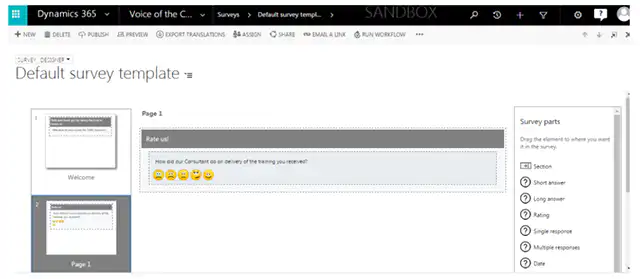
2. You can create any survey in line with your own brand identity and favorite colors. You can also upload your logo or specific images.
3. You can view the responses that come in Automatically link to CRM cases, contacts, and leads.
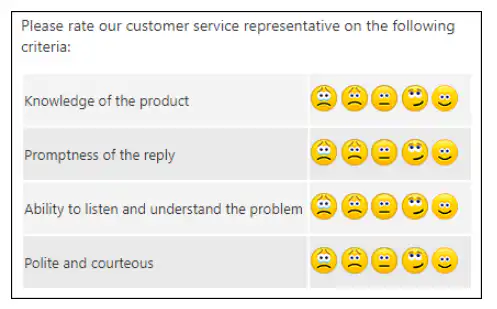
4. You can choose from a wide variety of question types with different options, such as smiley ratings, sliders, star ratings, drag-and-drop rankings, checkboxes, radio buttons, … . There are more than enough options to make your questionnaire varied.
5. You can ‘Skip Logic’ method use this feature so that respondents are shown a different question or questions based on their answer to a previous question. This allows you to keep your questionnaire short and relevant and increase the response rate.
6. Each survey allows you to Personalize using known data from Dynamics 365. For example, you can have a customer's first name automatically added to the survey. If a customer receives a personalized questionnaire, he or she will be more likely to fill it out.
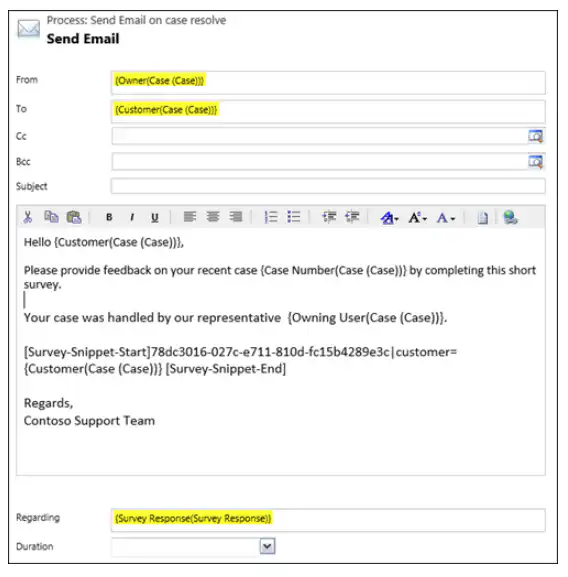
7. You can take the surveys send via email to your contacts from Dynamics 365, but just as well through a CRM workflow. For example, it is possible to create a workflow in which a satisfaction survey is sent every time a case is closed by customer service.
8. All responses are stored in Dynamics 365 This allows you to view the history of all feedback from a customer at any time.
9. You can measure the responses using various scoring models, such as the Net Promoter Score (NPS), Customer Satisfaction Score (CSAR), or a general satisfaction score.
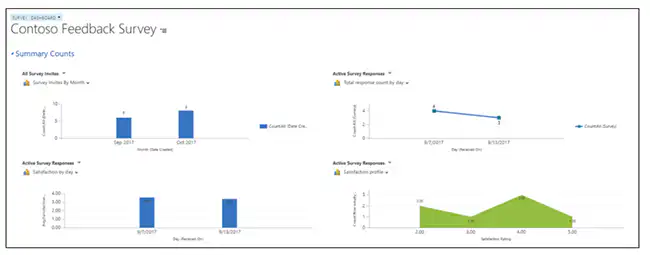
10. Using preconfigured or custom CRM Views and Dashboards You can analyze the answers immediately and easily. In addition, you can export this data to Power BI.