
Copilot and Agents: Your AI Assistant in Business Central
Business Central is the ultimate all-in-one, AI-driven solution for small and medium-sized organizations looking to grow through automation. The platform helps eliminate repetitive tasks and streamline work with powerful generative AI. Microsoft is investing heavily in this AI transformation and provides partners with the tools to leverage their expertise to deliver even greater value.
Safety First
Even in the age of AI, your data remains protected. Business Central meets the highest standards for security, privacy, and compliance. Furthermore, Microsoft adheres to the principles of Responsible AI, which puts people first.
What is Copilot?
Copilot is your AI assistant that boosts productivity, stimulates creativity, and takes care of tedious tasks. With a Business Central license, everyone gets Copilot—at no extra cost. Copilot offers a growing range of capabilities to guide, search, compare, analyze, advise, and summarize.
This includes chat functionality for quick responses and task-specific features such as assistance with bank reconciliations. Everything is seamlessly integrated, so you don’t have to switch between applications as often.
Autonomous Agents: Smart Process Automation
In addition to Copilot, Business Central is introducing autonomous agents that intelligently automate key business processes. For example, the Sales Order Agent processes sales orders from emails and attachments, interprets unstructured data, and generates accurate sales documents.
Important: Copilot and agents are available exclusively for Business Central online customers.
Electronic Documents: Efficiency and Accuracy in One
With Electronic Documents in Business Central, sending and receiving electronic documents becomes much easier. This feature reduces manual data entry and minimizes errors, making processes run more smoothly.
Electronic documents are digital versions of business documents that can be exchanged in accordance with a specific format or standard. For example:
- E-invoices: invoices in an electronic format such as UBL, PEPPOL, or EDIFACT.
- Shipping and transfer documents (available starting in 2026).
- Bank files: for electronic payments (SEPA, for example).
In Business Central, these documents can be automatically generated, validated, and sent. Documents can also be received through the same process and converted into operational documents (such as purchase invoices).
What are the benefits of electronic documents?
- Higher productivity: Less time spent on repetitive tasks, more focus on strategic work.
- Improved data accuracy: Reduced risk of human error.
- Enhanced security: Sensitive information remains well protected.
- Cost and time savings: Optimization of operational processes.
PEPPOL Integration
Business Central supports the sending and receiving of electronic documents in PEPPOL format via a preconfigured Electronic Document. This allows you to exchange sales invoices, credit memos, and purchase invoices, among other things. This makes it easy to comply with legal requirements and do business with governments and companies throughout Europe.
Starting now, you can even export payment reminders and interest statements as PEPPOL files and automatically embed attachments (such as PDFs) in PEPPOL documents.
By using PEPPOL, you’ll benefit from:
- Faster Invoice Processing
- Lower risk of errors thanks to standardized formats
- Improved compliance with European regulations
PEPPOL requires a service provider (access point) to process electronic documents. Business Central provides standard connectors, and the list of supported service providers continues to grow.
Additional Features with Continia
Continia Document Capture or Document Output offers additional functionality such as OCR, advanced matching, workflow automation, and comprehensive compliance options. For companies with complex scenarios or additional requirements (e.g., multiple networks, advanced validation), Continia can be a valuable addition.
In short: Business Central supports PEPPOL out of the box, but Continia adds additional layers of automation and compliance.
Watch our webinar on what's new
In this on-demand webinar, you’ll get a comprehensive overview of the key innovations in Business Central Release Wave 2 (2025). Our experts will show you how to put these updates to practical use to make your processes smarter, faster, and more reliable.
Subcontracting in Manufacturing Processes: Managing Outsourcing in Business Central
Many manufacturing companies outsource (parts of) their production to external suppliers—sometimes as much as 75%. This can result in significant cost savings and provide access to specialized knowledge and technology that is not available in-house. Business Central expands the standard capabilities to manage these subcontracting scenarios in an integrated and transparent manner.
Logistics flows for raw materials and components
Manage transfers to and from subcontractors, including warehouse handling and item tracking.
Flexible Pricing
Include variables such as work centers, items, dates, and quantities to intelligently determine cost prices and rates.
Receipt of finished goods from purchase orders
Record finished goods, including tracking information, using warehouse documents that are directly linked to your purchasing process.
Logistics Process for Returning Finished Products
Streamline the transfer of finished products from the subcontractor back to your own warehouse.
Improved user experience and transparency
Gain greater insight into lead times, costs, and quality across the entire supply chain.
Practical example
A manufacturer that handles R&D, design, QA, and sales in-house can outsource coating or assembly. Business Central then supports:
- sending and recording components to the subcontractor,
- receipt of the finished product with proper lot/serial number tracking, and
- applying subcontracting rates based on workstations and batch size.
Availability and Scheduling
Based on the current release schedule, general availability (GA) is scheduled for December 2025.
Quality Control: Assess the quality of incoming goods and materials
The new Quality Management extension in Business Central helps companies comply with industry and regulatory standards. By incorporating quality checks into the process of receiving or manufacturing goods, you increase product reliability and give customers confidence in consistent quality.
Define quality controls
Set the scope and parameters for quality checks at various levels: individual items, groups, lot numbers, or serial numbers.
Process Integration
Purchasing Receipts: Verification after posting the receipt, with or without warehouse processing.
Production Output
Manual or automatic inspection (flushing) to verify that products meet specifications.
Assembly Output
Manual or automatic inspection (assembly-to-order).
Triggers and Timing
Activate checks manually, upon specific events (e.g., recording of receipts), or at scheduled intervals.
Parameters and External Analysis
Measure physical properties such as weight, dimensions, and density. Set up samples for external laboratory analysis.
Quality Plans and Quarantines
Define test plans, triggers, and quarantine rules to block non-compliant products.
Reporting and Compliance
- Quality Certificates and Certificates of Analysis for compliance with standards.
- Overviews of quality status and quality orders to provide insight into batches and customer requirements.
Availability and Scheduling
General availability (GA) is scheduled for December 2025. Features and timing are subject to change. The feature will be delivered as an extension. It will be installed automatically for new environments; for upgrades, installation via AppSource is required.
Find pages and reports faster with the new search feature
We've all been there: you're looking for a report or page in Business Central, but you can't remember the exact name. That takes time and is frustrating. Less time spent searching means more time for your actual work.
With the new AI-powered advanced search feature in “Tell Me,” that’s a thing of the past. This feature helps you find what you need faster, even if you don’t know the exact term. It also allows you to search in one language and get search results in another language as well. For example, if Business Central is set to English, you can search for “inkooporder,” and the smart search feature will understand that it should display “purchase orders.”.
How does it work?
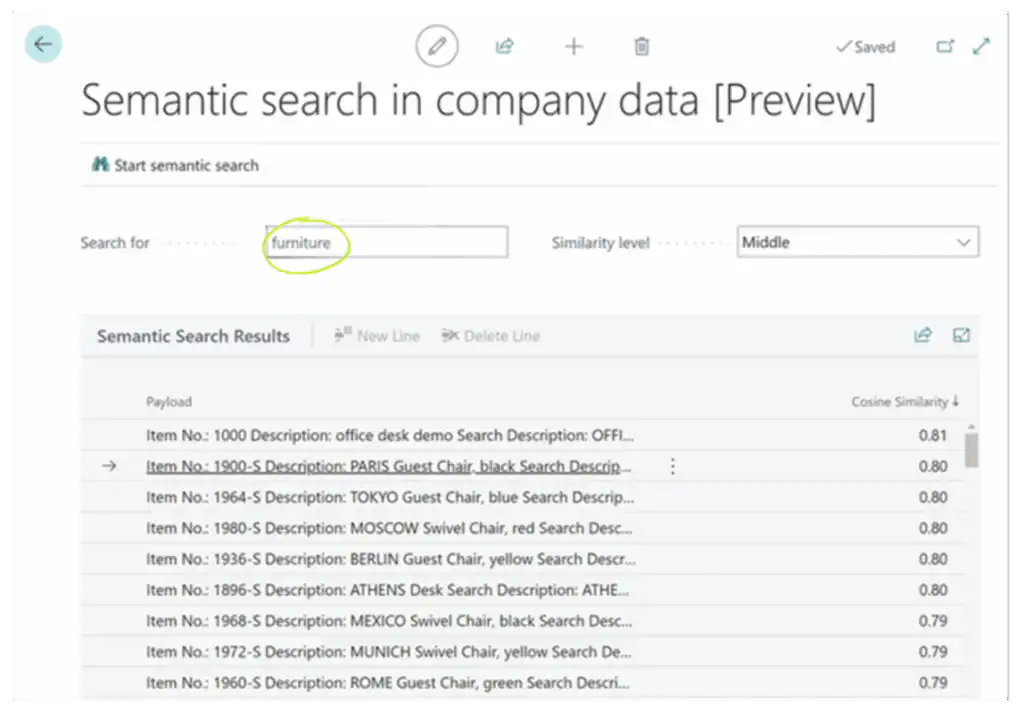
The new advanced search feature in “Tell Me” uses semantic search technology. This means that the search feature doesn’t just look for exact text matches, but also understands the meaning of your search query. As a result, you’ll get a much more relevant list of results, with pages and reports sorted based on their content and attributes.
You can access this feature via “Tell Me” (Alt+Q) or directly from the Role Center or Report Explorer. When you enter a term in the search box and select “Try Advanced”, Tell Me automatically opens the “Advanced” tab” and displays the improved search results. From there, you can easily enter new search terms to further refine your results.
Take advantage of the latest innovations
Would you like to be the first to take advantage of these innovations? Contact us right away!


