

Continia Document Capture is an end-to-end solution for importing complete purchase invoices and credit memos directly into Microsoft Dynamics 365 Business Central or (Dynamics NAV) to import, register, approve, and archive. Other document types can be processed in a similar, easy manner, and all of this happens with minimal user involvement. This saves you both the time and the hassle of manually entering incoming documents—you don’t even have to type anymore…
Purchase-to-Pay
Purchase-to-pay is a comprehensive procurement system for businesses, covering everything from the purchase of goods to payment to the seller. Purchase-to-pay is also known as P2P, procure-to-pay, eProcurement, or req-to-check. The purchase-to-pay process is automated, reduces costs, and minimizes risks.
Specifically, with P2P, you can handle all aspects of accounts payable processes without ever leaving your Dynamics ERP system.
Scanning is performed from Dynamics 365 Business Central or NAV, while OCR technology enables specific information—such as barcodes—to be automatically recognized, recorded, and validated within your ERP application. From within Dynamics, you can also set up approval workflows that allow employees to digitally approve documents or forward them to another person. Finally, all documents are stored in a digital archive, and the original is always directly accessible from the ERP system.
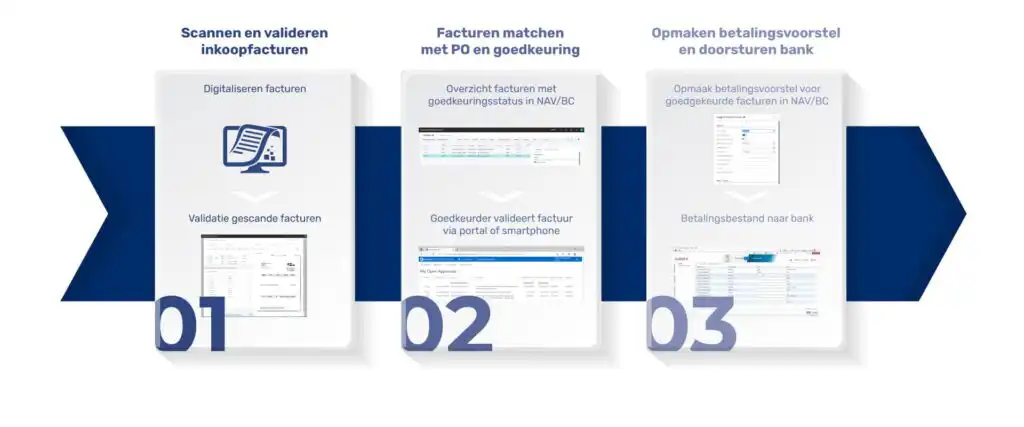
Automated Invoice Processing and Management
Document Capture streamlines the processing and management of purchase invoices with many new features, such as: automatic vendor recognition, document overviews, incoming registration, and much more. Thanks to 3-way matching, invoices can be automatically linked to existing purchase orders or receiving slips—whether approved or posted—when the amount falls within the specified thresholds.
Everyone within the company has access to the approval workflow. Approvers can view the original invoice on their screen and accept it, put it on hold, or forward it to a colleague for review or approval. Comments can also be easily added.


