Exact Lightweight Integration Server (ELIS)
Microsoft has announced that support for Basic Authentication on SMTP within Office 365 will end in September 2025. This applies to sending emails (SMTP). Support for incoming email had already ended in 2023.
Within applications such as ELIS SMTP with Basic Authentication is (often) used.
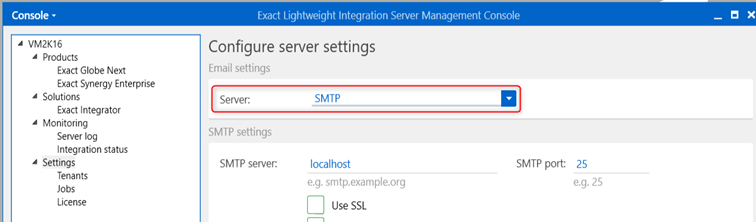
Open the ELIS Management Console and go to Settings > the ‘Server’ field. If the SMTP option is selected here, the discontinuation of Basic Authentication will affect your setup. Follow the steps below to reconfigure this correctly:
1. Open the ELIS Management Console.
2. Select "Settings" in the left pane.
3. Under Server, select the Exchange Online option.
4. Enter the relevant Tenant ID in the Tenant ID field.
5. In the "Client ID" field, enter the applicable Application (Client) ID.
6. Under "Client Secret," enter the corresponding client secret (value).
7. Click Save to save the changes.