Follow the steps below to create a new service desk ticket in the Exact and Business Cloud portal.
1. Log in with your credentials at Exact and Business Cloud Portal. Don't have login credentials yet? Read here how to request access to the portal.
2. In the menu on the left, click ‘Service Desk.’.
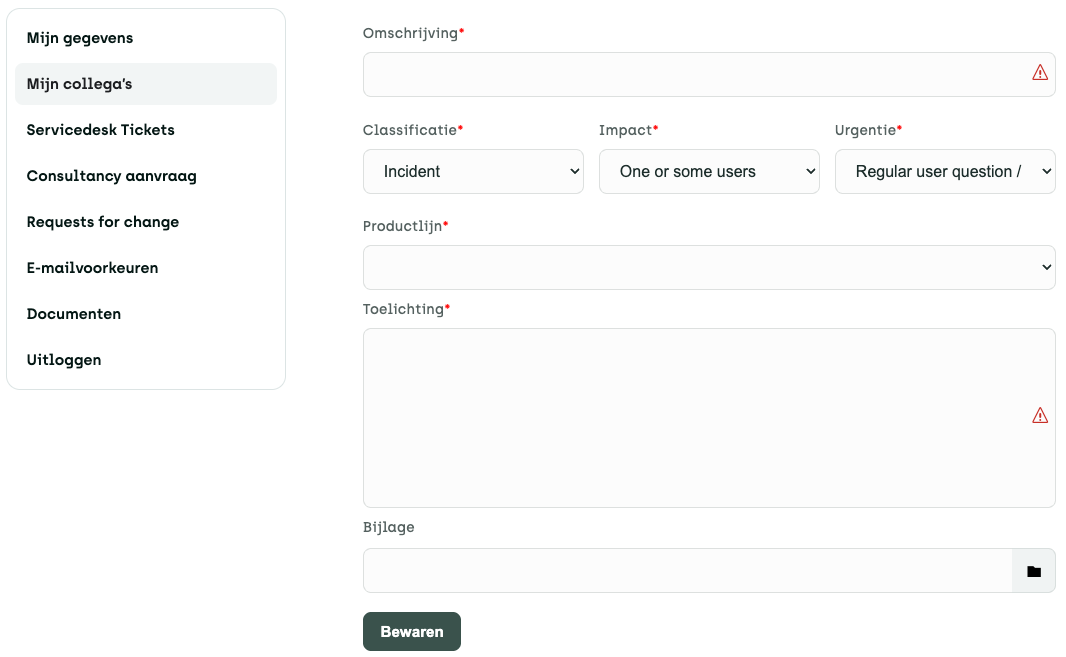
3. Next, click the ‘New’ button. A new screen will open (see screenshot below).
4. Please fill in the fields below:
- Description: Please describe the nature of your question or problem in this field.
- Classification: This value is filled in automatically, so you do not need to change it.
- Impact: Indicate how many users are affected by this issue.
- Urgency: Please indicate whether this is a question or a problem. If it is a problem, please also indicate its urgency.
- Product Line: Select the product related to your question or issue.
- Explanation: Please provide as much detail as possible in your report. This will help us process it more effectively.
- Attachment (optional): If necessary, attach a screenshot or document to clarify your explanation.
5. Click the ‘Save’ button to create your ticket.
If this doesn't fully answer your question, please contact our Service Desk at 088 411 42 00 or ask us your question portal. Do you have any more questions about the portal? Then click here.