
Microsoft will stop supporting Internet Explorer 11 on June 15, 2022. As of now, you can also connect to the Business Cloud using Microsoft Edge, Microsoft’s new browser. You can set it up by following these steps, which you can also view at this video:
Step 1. Open Microsoft Edge (not in the Business Cloud!)
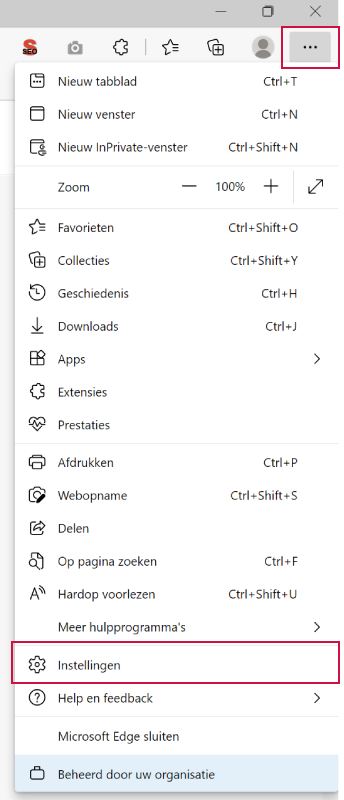
Open Microsoft Edge on your computer (not in the Business Cloud!). In the browser, click the three dots in the top-right corner and go to Settings.
In the settings, navigate to the Default Browser screen. For the option: Allow sites to reload in Internet Explorer mode the field Default to Allow and then click on Restart. Microsoft Edge is now restarting.
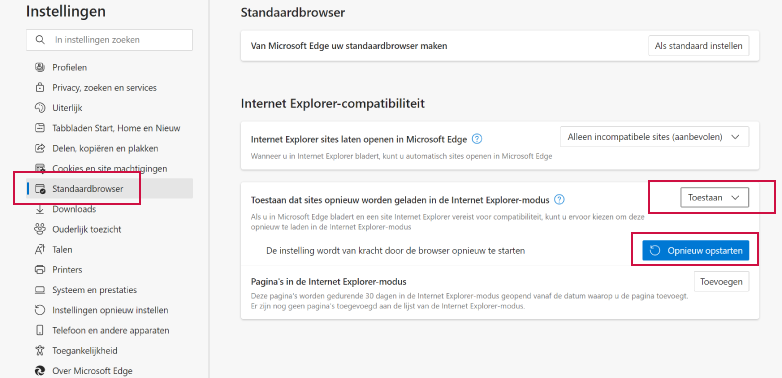
Next, click "Add" and enter the following: https://portal.advisie.nl in.