

“If my company already has an ERP system, why do I still need separate CRM software?” We get this question regularly from our prospective clients. In this blog post, we’ll focus on the difference between CRM and ERP and about what a possible integration could be from either tool.
What is the difference between CRM and ERP?
CRM and ERP have clearly different purposes.
ERP (Enterprise Resource Planning) software is primarily used to support financial and logistical business processes. A well-designed ERP system ensures that orders are properly recorded, jobs are delivered correctly, and invoices are sent out. This is the core of every company.
CRM (Customer Relationship Management) software is used to support commercial business processes (marketing and sales) and customer service. A CRM system allows you to manage customer and prospect data as well as potential sales opportunities. You can use it to view sales results, track the success of marketing campaigns, and, of course, much more. What more and more people are realizing is that these commercial processes the start are all sorts of things. Even after an order has been completed and the invoice has been sent, excellent service is what leads to repeat business. In your CRM software, you manage the business relationship with the customer before, during, and after the completion of orders.
Sometimes companies choose to expand their ERP system with a sales, marketing, or service module. Others choose to implement a separate CRM system and integrate it with their ERP software.
Should CRM be part of ERP?
ERP system vendors often expand their ERP software with an additional CRM module. This extra module usually does offer the basic CRM functions. But as we described above, ERP, not CRM, and CRM, Not ERP. Both systems are complementary.
One of the advantages of choosing standalone CRM software is that you can best solution can choose for your specific business objectives and CRM strategy. You do not need to take into account any limitations in the existing ERP software.
In addition, a separate CRM tool is also a plus for, for example, the user acceptance by your salespeople. This is because CRM is better suited to the users’ needs—those of the salespeople—and the context in which the software is used. For example, we’re thinking of mobile use while on the way to a customer. ERP software is generally not accessed via a mobile internet connection, whereas CRM is.
Finally, the cost often in favor of standalone CRM software because a user license for ERP is typically more expensive. We’re assuming here that your employees will use either ERP or CRM, but not both. If CRM is properly integrated with ERP, your CRM users will no longer need access to ERP.
A combination of CRM and ERP
CRM and ERP can be easily integrated. Although integrating CRM and ERP poses few technical challenges, it’s best to seek advice from an experienced specialist. To give you an idea of the questions that may arise, we’ll explore the options below.
What would a potential integration between CRM and ERP look like?
Below, we describe what an ERP-CRM integration might look like. Of course, there may be variations depending on the specific company.
The question we want to answer: Which data source should be the master for which data?
In other words, in which application do we centrally manage which data?
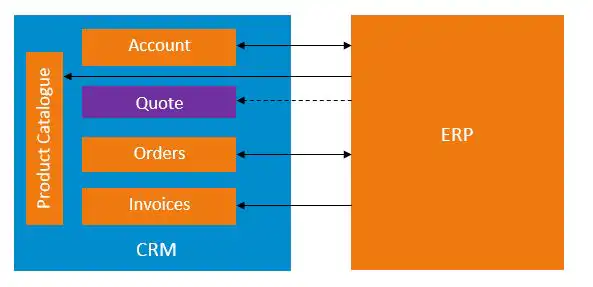
When we look at the process from lead management to account management, the following apply:
- Lead, Opportunity, Service & Account Management typical CRM processes.
- Orders & Invoices are typically handled in ERP systems.
- Quotes fall into a gray area because both CRM and ERP can be used to generate quotes.
#1 Existing Customer Data
Since invoices are generated from the ERP system, we assume that the ERP system contains the correct company information for the paying customers (Accounts). That is why it is advisable to use ERP to master database to make from the existing customers. This means that you manage the customers' master data in the ERP system and then synchronize it from the ERP to the CRM. In the CRM, it is best to ensure that this master data can only be viewed and cannot be modified.
For example, if you have a Account-When you view the form in Microsoft Dynamics CRM after synchronization with the ERP system, the company name, business ID, billing address, payment terms, … read-only. You can, however, fill in other fields related to sales and marketing—such as business activities, expertise, interests, business relationships, sales targets, SWOT analysis, etc.—in your CRM system.
#2 New Customer Information
When a salesperson receives an initial order from a potential customer, they record it in the CRM, and the potential customer becomes a new customer. You will then need to synchronize this new customer from the CRM to the ERP. We recommend that you Customer acquisition process from CRM to ERP as best as possible to automate. This way, you can prevent your employees from having to manually copy unique keys from one application to another. This is inconvenient and leads to errors.
#3 Product Catalog
You can use CRM software to manage everything from quotes through to order processing. You can then import those orders into the ERP system. This does, however, require that the product catalog be synchronized from the ERP system to the CRM system.
So, ERP is product catalog. In CRM, in that case, a read-only A product catalog is available that is automatically kept up to date from the ERP system. A won quote is converted into an order in the CRM and is transferred from the CRM to the ERP system.
Ideally, we have a two-way synchronization, because it's helpful if you can view the order's fulfillment status from the ERP system (fulfillment status) can be fed back into the CRM.
#4 Sales Data
Your sales department needs revenue reports to compare its sales results with its sales targets. The actual revenue figures You can retrieve this information from your ERP system based on the invoices. In addition, you can track outstanding amounts in your CRM environment by synchronizing the payment status from your ERP application.
In addition, if you have the revenue data track this over time, you’ll gain insight into customer trends: who are the winners and who are the losers? Finally, if you also use ERP to cost data If you track this based on activities, it becomes possible to calculate customer value and visualize it in CRM. Based on customer value, you can then assign a different, customized approach to each customer and track its implementation in CRM.
Conclusion
In this blog post, we took a closer look at the differences between CRM (Customer Relationship Management) and ERP (Enterprise Resource Planning). We also provided an overview of what a possible integration may exist between the two packages. Of course, every organization has its own needs, and certain differences are inevitable.
But the key message is the same for everyone, namely,. ERP and CRM are complementary applications that, when used together, form a powerful combination.


