

In the latest version of Microsoft Dynamics 365 Business Central (BC28) Microsoft integrates AI, quality control and insights directly into Business Central. AI agents are available natively through the Agent Designer, quality inspections upon receipt are included as standard, and drop shipment is finally a controlled end-to-end process. Combined with faster invoice processing and real-time item KPIs, Business Central provides greater control, less manual work and better insights.
In this blog, you will discover the most important new features in the first release wave (RW1) of 2026.
Agent Designer: AI as an architectural layer
Microsoft has made a clear architectural choice: AI will become a permanent layer within Business Central, rather than an add-on.
The Agent Designer allows consultants and power users to design and validate company-specific agent scenarios in a sandbox environment using natural language, with a complete audit trail and native integration with the BC permission model.
Quality control upon receipt
Until now, quality management in Business Central was the exclusive domain of external ISV solutions. BC28 fundamentally changes this: quality inspections are now a standard part of the receiving process, without requiring an additional licence or custom development.
When a purchase receipt is posted, BC automatically creates a quality inspection by lot number, with configurable sampling percentages and measurement parameters such as weight and dimensions. Rejected items are blocked, moved to quarantine and processed through the item journal. Standard documents such as a Non-Conformance Report or Certificate of Analysis are also included.
For companies in the food, pharmaceutical or manufacturing industries, this delivers immediate and tangible added value: complete traceability from receipt to rejection, entirely within BC, without paperwork or a separate application.
Drop shipment is now a controlled process
Drop shipment has always been a manual and error-prone process in Business Central. BC28 addresses three fundamental pain points in a single release.
Create a purchase order directly from the sales order.
A new action on the Sales Order page allows users to create purchase orders with a single click. BC automatically retrieves the vendor information from the item card or SKU. The integration with the planning worksheet has also been updated: drop shipments are now treated as a fully fledged supply element in planning worksheets.
Post purchase and sales invoices independently.
Until BC27, a purchase invoice for a drop shipment could not be posted before the corresponding sales order had been invoiced. This restriction has now been removed. Vendor invoices can be processed as soon as they arrive, regardless of the status of the customer invoice.
Undo a drop shipment before invoicing.
Correcting a delivery error previously required a complicated credit memo process on both sides. Now, a single action is enough to undo a posted drop shipment, provided it has not yet been invoiced.
Together, these three improvements finally turn drop shipment into a mature, integrated process within Business Central.
Get Order Lines: link multiple lines to a single invoice
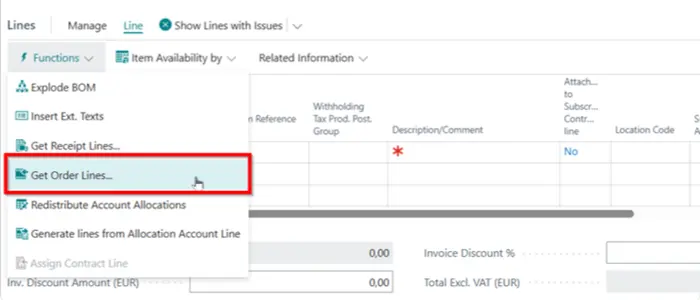
A vendor sends a single consolidated invoice for multiple partial deliveries across different orders: this is a common reality for many purchasing departments. Until BC27, each receipt line had to be found and linked manually. With BC28, that is a thing of the past.
The new “Get Order Lines” action on the purchase invoice opens an overview of all relevant order lines—whether already received or still outstanding—and allows multiple lines to be linked to a single invoice in one step. New filters have also been added to the “Get Receipt Lines” page, allowing users to search by vendor reference, order number or item reference instead of scrolling through a long list.
Less manual work, less time spent searching and a lower risk of errors—with invoice processing that finally reflects how vendors invoice in practice.
Reporting
BC28 strengthens the analytical layer at three complementary levels, with one shared ambition: providing the right information at the right time, directly within Business Central, without exports or separate reports.
KPIs per item on the item card.
A new page displays the most important financial and operational metrics for each item: current inventory value, expired inventory, revenue, net revenue, gross margin and revenue growth—each across four time periods: the current period, current fiscal year, previous fiscal year and lifetime. This is complemented by a Copilot-generated summary based on historical patterns. No report, no Power BI and no export required.
Predefined analysis views for Item Ledger Entries.
Analysis views can now be included as a standard part of a BC extension. This means partners and ISVs can incorporate ready-to-use analysis tabs into their solutions, making them available to every user from day one without any configuration.
Financial Reports
Financial Reports were introduced in BC22 as the successor to Account Schedules. In BC28, they gain a mature management layer, including status management for each report definition (draft, published or blocked), an audit log of changes and report categories for clearer navigation. Anyone already working with Financial Reports will immediately recognise the impact of this improvement.
Item variants with images and attributes
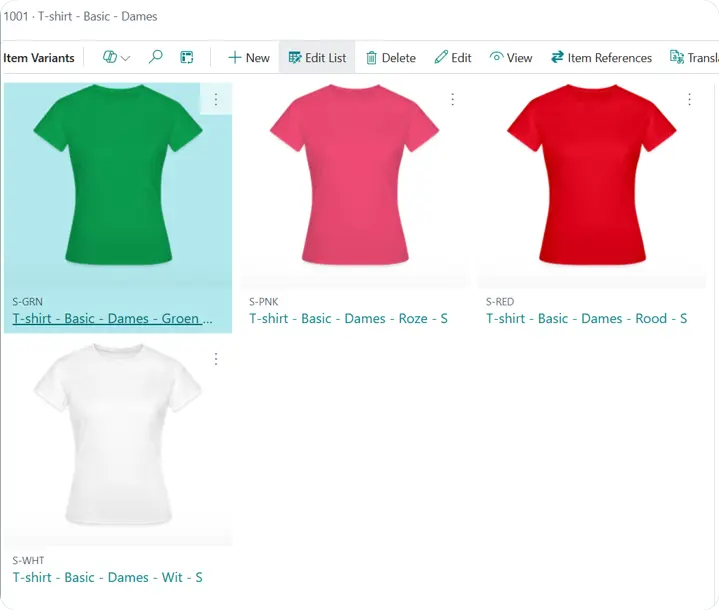
Each item variant now has its own image and attribute values in Business Central. Colours, sizes and materials can be managed and displayed by variant, and automatically synchronised with the webshop through the Shopify Connector. No more manual workarounds for product catalogues containing variants.
New planning settings on the Location Card
Two new fields on the Location Card provide the planning engine with explicit instructions on what to do when no SKU exists for a particular item-location combination. Whether to plan, use the parameters from the item card or exclude the location from planning entirely can now be configured for each location. Showrooms, return locations and transit locations will no longer generate unwanted purchase suggestions.
Replace fixed dates with date formulas in General Ledger Setup
The fixed dates used to define permitted posting periods in General Ledger Setup can now be replaced with date formulas. Configure –CM and CM once, and the posting period will automatically move with the work date. No more manual updates at the beginning of every month and no more helpdesk calls from users who are unable to post.
Approvals for requisition and planning worksheets and item journals
Approval workflows already existed for purchase orders and journal entries, but until now, the planning worksheet that generates those orders remained entirely outside the approval process. BC28 closes this gap: batches in the planning worksheet, requisition worksheet and item journal can now be submitted for approval before a single order or journal entry is created. This represents a tangible step forward for organisations with internal controls governing purchasing and inventory processes.
Coming soon to Business Central: Self-billing
Self-billing, where the buyer creates an invoice on behalf of the vendor based on a mutual agreement—is a practice that still requires manual workarounds or custom development in most ERP environments. Microsoft has announced native support for self-billed invoices in Business Central.


