

Of course, you want to offer your customers fast online service, because this leads to a better customer experience and greater satisfaction. To achieve this, we recommend the Omnichannel Customer Service App in Dynamics 365. This allows you to in real time communicate with customers through their preferred digital channel.
In this blog post, we'll discuss the app's live chat feature.
Live Chat: What Is It and Why Use It?
With the Live chat feature of the Omnichannel for Customer Service app You can use a chat window on your website to quickly respond to simple and frequently asked questions using predefined answers. You can search through articles in the online knowledge base and share them with customers.
Live chat is also an effective sales tool and isn't limited to just (technical) customer support. By answering questions in real time during an online purchase, you can give a hesitant customer that final nudge they need to go ahead and buy the product. Or you can help them navigate to the right place if they're looking for specific pages or products.
During each chat, you can take notes in a separate tab. These notes are saved in the conversation record and linked to the appropriate contact, case, or other record type in Dynamics 365. Chat transcripts are also saved in the conversation record. This preserves the history of each chat session, including a timeline and details about transfers to other employees or escalations.
Chat Widget Design
In the Omnichannel Administration App, D365 admins can Create a new chat widget and add its HTML code to your website or to a specific customer portal to enable the chat feature.
There are several settings that allow you to configure the chat widget according to your preferences:
- widget icon
- theme color
- own logo
- title and subtitle
- “Enter the chat's ”opening hours”
- Enable the proactive chat feature (see below)
- Allow customers and employees to add and send files as attachments
- Enable the option to download and email chat transcripts
- Enable the option to show customers their place in line
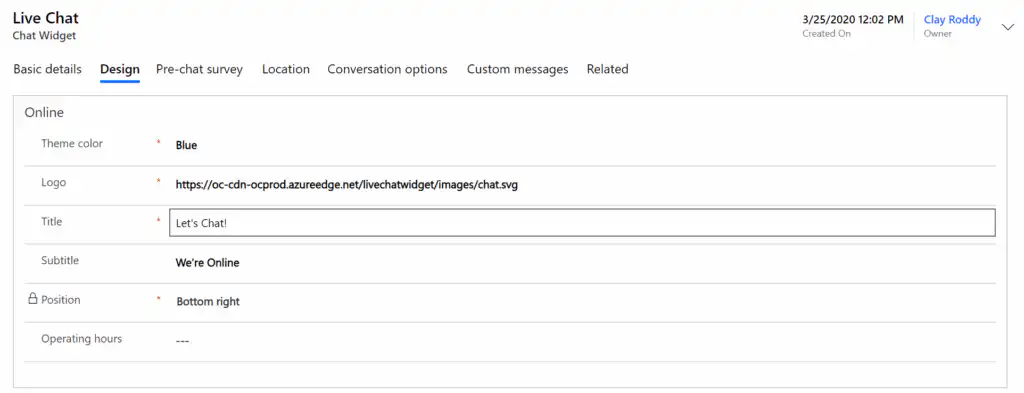
A chat window should always inspire confidence. So make sure it matches the rest of your website.
Proactive Chatting with Customers
With live chat, your customers can ask questions and chat with customer service through your website. Conversely, your employees can Reach out to them proactively and invite them to a chat. This can be largely automated based on configured rules. In other words, you can decide for yourself when it’s best to suggest a chat conversation to the customer.
For example, when:
- a customer stays on a specific web page for X number of minutes.
- A visitor always returns to the same web page. Perhaps this person can't find what they're looking for.
- Someone on your website views a page with special offers for a product.
When the proactive chat feature is enabled, customers are automatically invited to chat via a personalized message.
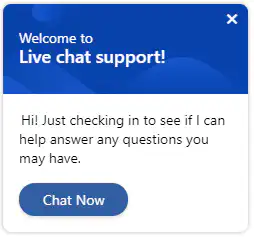
Of course, the customer can choose for themselves whether or not to accept the chat invitation. If they don’t, it means they’re not interested, so there’s no need to spend valuable time on it. Customers who do want to learn more about your products or need to speak with someone will accept the chat invitation. Your employee will then receive the following notification.
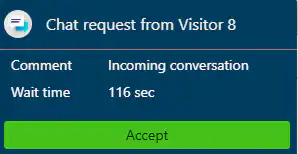
After clicking “Accept,” a complete customer overview is loaded with all available information about the customer, including details about the product or service, the issue, the request history, related requests, and the location.
Proactive assistance is appreciated by customers, but it can also be annoying. That’s why it’s important to handle this properly. So don’t reach out to your website visitors too quickly, and give them enough time to browse on their own first. Make sure your customers don’t feel like they’re being spammed.
Extend to voice/video call
Since the latest release of Dynamics 365 in April, it has been possible to escalate a chat conversation to a voice or video call. Voice calls can be more efficient for resolving more complex customer issues. Adding video helps build a more personal connection and allows you to quickly share visual information.
*** Omnichannel for Customer Service consists of a single interface for various communication channels (live chat, Facebook, Twitter, WhatsApp, etc.). The app is available through the Unified Service Desk application or the Unified Interface app for Customer Service. The application is not supported for Dynamics 365 On-Premise/Customer Engagement or on mobile devices (phone/tablet).


