

With ClickDimensions email marketing You can quickly and easily create and send emails to your potential and existing customers. Examples of email marketing include newsletters, emails with promotional offers, prospecting emails, and more. These are emails that allow you to directly engage with your customers and triggers to take action.
Key Benefits of ClickDimensions Email Marketing
- ClickDimensions is fully integrated with Microsoft Dynamics 365 which allows you to personalize your email with information from your CRM database.
- You decide how you want to format your email. ClickDimensions offers four options to choose from. Would you like to create an email using HTML, or would you prefer to use pre-made templates?
- You can send your email to individual recipients or to marketing lists from your CRM database, and you can also send them based on a workflow that's easy to set up.
- Every interaction via email is received in Microsoft Dynamics 365 and can trigger a workflow.
- Thanks to the reporting features in ClickDimensions, you can track key metrics to assess how successful your email marketing campaign is.
How can I send an email using ClickDimensions?
1) Create an ‘Email Template’
You start by creating a ‘Email Template‘.
STEP 1: Go to Microsoft Dynamics 365. Click ‘Marketing‘ => ‘Email Templates‘
STEP 2: Click on ‘New‘To create a new email template, enter the name, subject, and email type (see below).".
2) Choose how you want to format your email
Once a new email template has been created, you can start creating your email. ClickDimensions email marketing offers you a choice of four different methods.
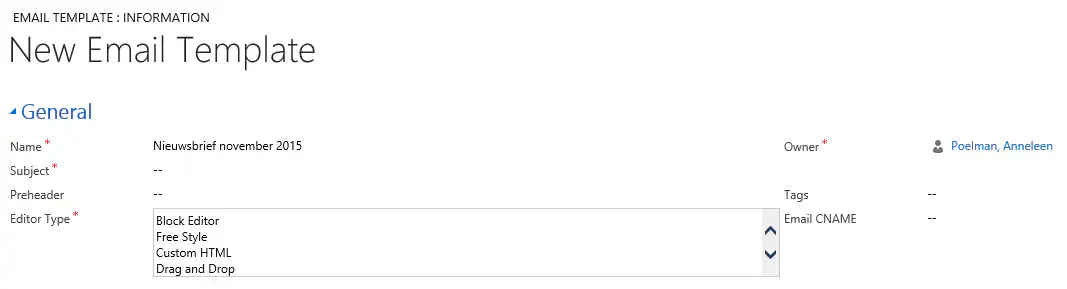
- With the built-in Drag-and-drop editor You can choose from various layouts and customize them further by adding different content blocks (‘text only‘, ‘image only‘, ‘text and image‘) to drag (drag-and-drop) within the layout you have chosen.
- With the Block Editor You can choose between pre-made templates and further customize your email using a What You See Is What You Get Editor.
- The Freestyle Editor This is a more advanced formatting option and requires knowledge of HTML. You can upload the HTML code from an existing email template and edit it further within ClickDimensions with a WYSIWYG Editor.
- If you choose the Custom HTML Editor, design your own template using HTML without a WYSIWYG Editor.
TIP 1: Before sending your email, you can use the handy ‘Inbox Preview’ feature to see how your email will look in various email clients, such as Outlook, iPhone, iPad, Android, Gmail, and more. .
TIP 2: If you want to reuse the same email template for another campaign, you can easily do so using ClickDimensions‘ ’Clone‘ feature. When you click the ’Clone” button, a new window will open with a copy of the original email template. You can then customize the subject line, text, and images as desired. This saves you a lot of time because you don’t have to create an email template from scratch every time.
3) Send your email via ‘Email Sends’
Once you have composed your email, you can send it using the ‘Email Sends‘.
STEP 1: Go to Microsoft Dynamics 365. Click ‘Marketing‘ => ‘Email Sends‘
STEP 2: Click on ‘New‘to set a new record‘Send Email‘Create an email and specify the name from which you want to send it, when, and to whom. As we mentioned earlier, ClickDimensions allows you to send email messages to individual recipients or marketing lists, as well as based on a CRM workflow that’s easy to set up.".
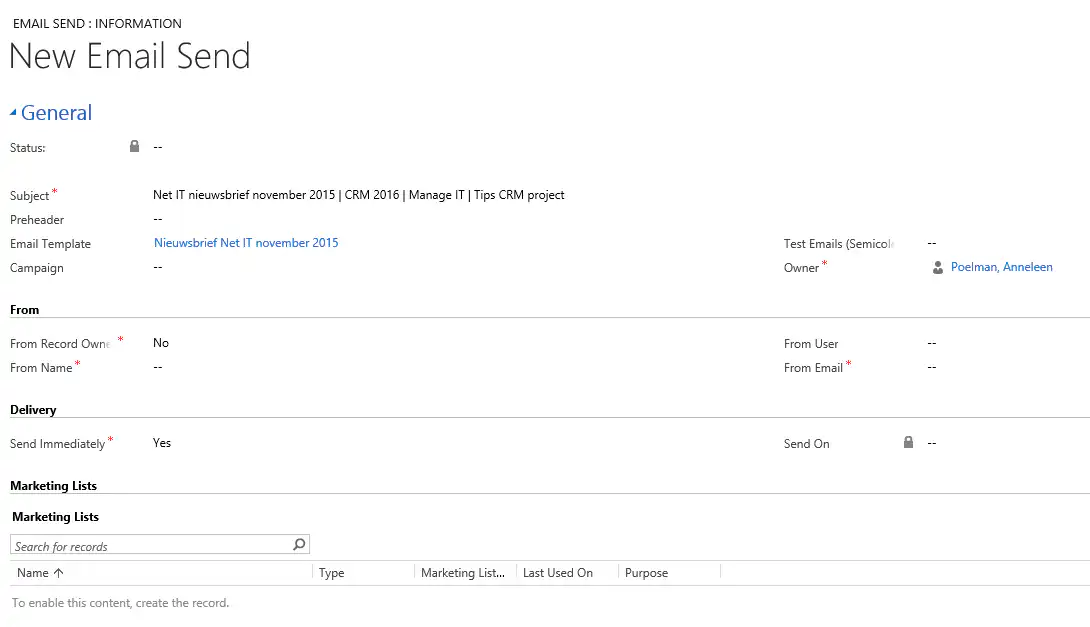
Tip: Before you send your email, you can first click ‘Test Email‘Send it to yourself or one of your coworkers.".
4) View key metrics using ClickDimensions' reporting features
Because email marketing allows you to reach your customers or prospects directly, it can be a very effective way to generate new leads. But you won’t know how successful an email campaign is unless you measure it properly. With ClickDimensions’ reporting features, you can quickly view the most important results: who received your email, who opened it, what are the open, bounce, and click rates, and more.
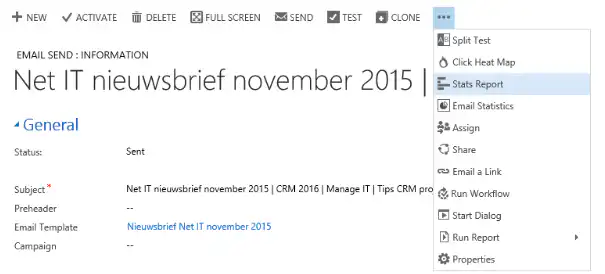
For example, through the ‘’Click Heat Map" As you can see which links a link in the email you sent was clicked, and the percentage of the total number of clicks on a specific link. This allows you to see at a glance which of your customers or prospects are interested in (which of) your products or services.
Be sure to read this blog post as well: Are you already using A/B testing for your email marketing?


