

With Release Wave 1, Microsoft is rolling out additional productivity and user experience enhancements for Dynamics 365 Business Central From April through September 2022. In this release, further investments are focused on helping users get up and running faster—whether they’re new or existing customers—by making in-app improvements to help them get started. At Alistar, we believe it’s definitely worth taking a closer look.
View the full release plan for [...]. here Dynamics 365 Business Central.
Released and available:
1. Perform a preliminary check of posting settings during data entry
Business Value
Microsoft Dynamics 365 Business Central 20 now introduces a priori posting validations.
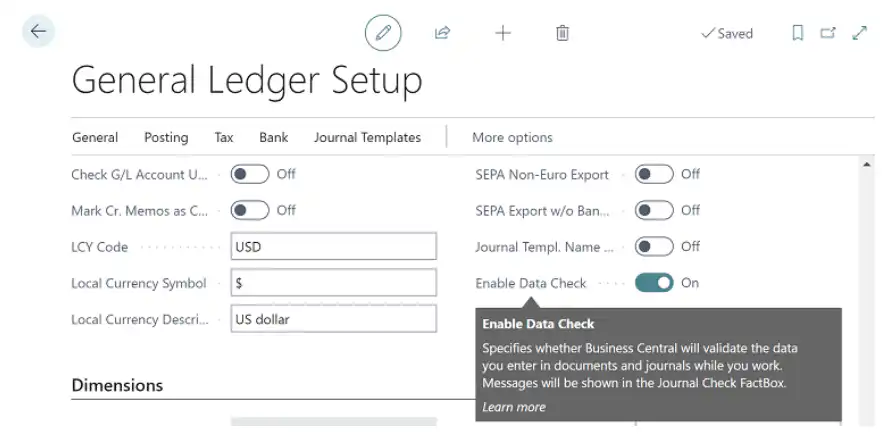
To alert users to posting issues with data in documents (orders, invoices, credit memos) and various journal entries—which could prevent the document or journal entry from being posted—Microsoft has introduced validations that immediately flag these issues. These early, unobtrusive visual indications that a problem exists can help improve productivity and save time.
Setup
Please note: This feature will be enabled after you confirm the following question:

Usage
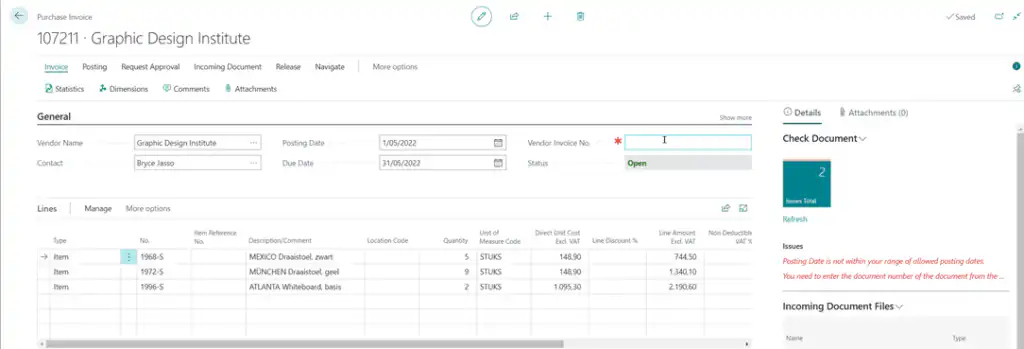
You can disable this in the General Ledger Setup (Accounting Settings).
The error messages regarding the missing purchase invoice number and the incorrect posting date would previously only appear when the purchase invoice was posted. With the updated functionality, these messages are now displayed on the screen while the invoice is being prepared.
2. Blocking the VAT Posting Setup
Business Value
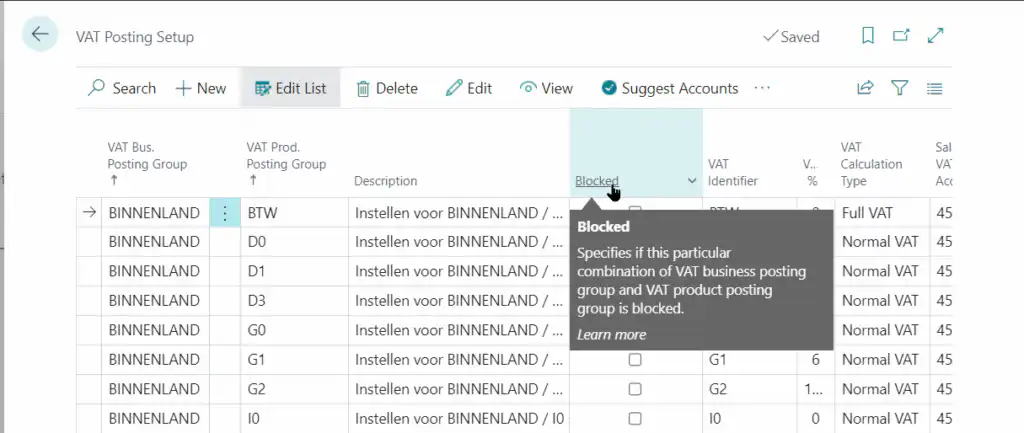
Changes to settings—especially when it comes to VAT—can have unpleasant consequences. Business Central 20 allows you to block certain combinations of VAT posting setups that, for whatever reason (whether business-related or due to changing legislation), are no longer needed. This way, they do not need to be deleted, and historical information remains available and consistent.
Setup
The unwanted VAT posting setting can be marked as blocked in VAT Posting Setup (VAT Booking Settings):
Usage
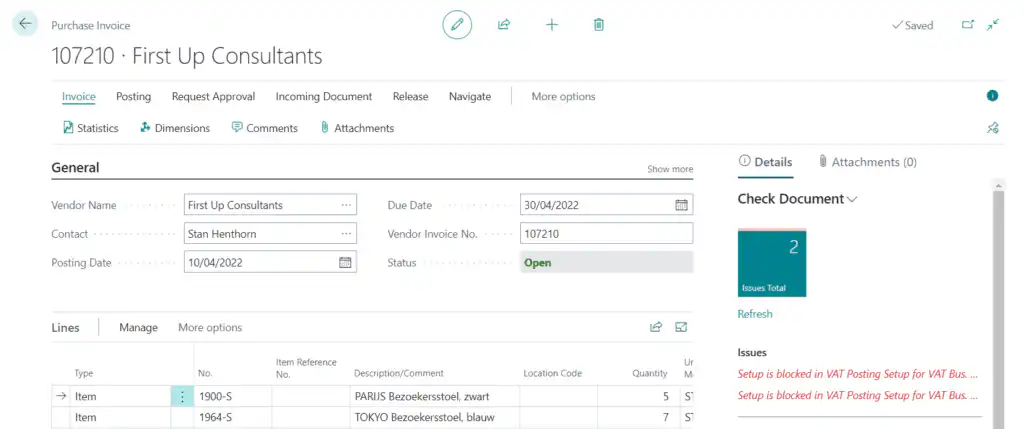
End users do not need to take any action for this; through the new feature Data Check The user is informed in advance.
3. Search for posts at all role centers
Business Value
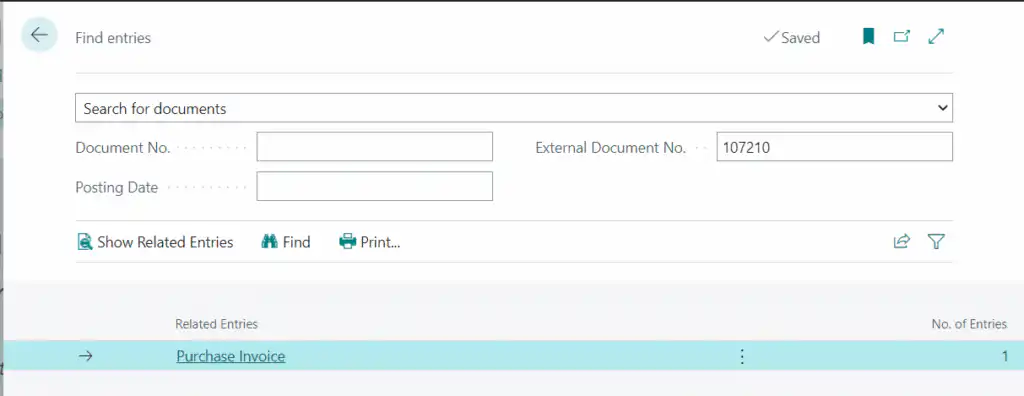
You can use the feature Find Entries Use this to search within the context of a specific posted document; the page displays all entries and references created for that specific document.
Less well-known—and therefore underutilized—is the fact that you can also use it for broader searches, such as:
- Search for documents based on a posted document number or external document number to locate a specific posted or unposted document and related entries. (See screenshot.).
- Searching for business contacts and business contacts related to a specific one using an external document number.
- Search for item references using serial or lot numbers to find all documents that contain an item with those numbers.
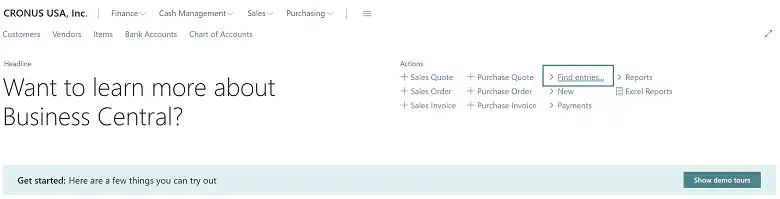
This feature is now available in all role centers, not just on booked documents.
Setup
No additional setup is required for this update. The button Find Entries (Search Posts) will be available at all role centers.
Usage
On other pages, other than the role center, you can always access the "Find Entries" feature using the key combination CTRL + ALT + Q
4. Deferred entries with separate date ranges per journal entry
Business Value
Companies use deferral codes in their accounting entries to recognize expenses and revenues in an accounting period that differs from the period in which the transaction was actually recorded. A classic example of this is insurance.
In previous versions, it was only possible to use deferral codes if the Books allowed starting at and Books Accepted for were scaled accordingly, which could lead to errors.
Starting with this version, each journal has a separate setting for its day-to-day use and the permitted deferral posting behavior.
Alistar had already included this feature in Business Central 18 Gfinance, and now Microsoft has made this feature available as part of the standard functionality.
Setup
A general date range for deferral entries can be specified in the General Ledger Setup.
This setting may be overridden on a journal-by-journal basis, if desired.
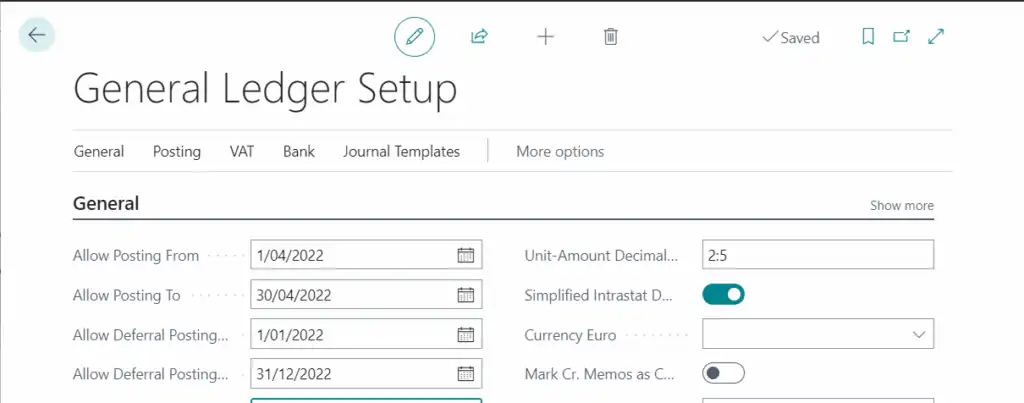
For each journal, you can specify whether deferral codes will accept a separate date format using the new fields Allow Deferral Posting From and Allow Deferral Posting To:

Usage
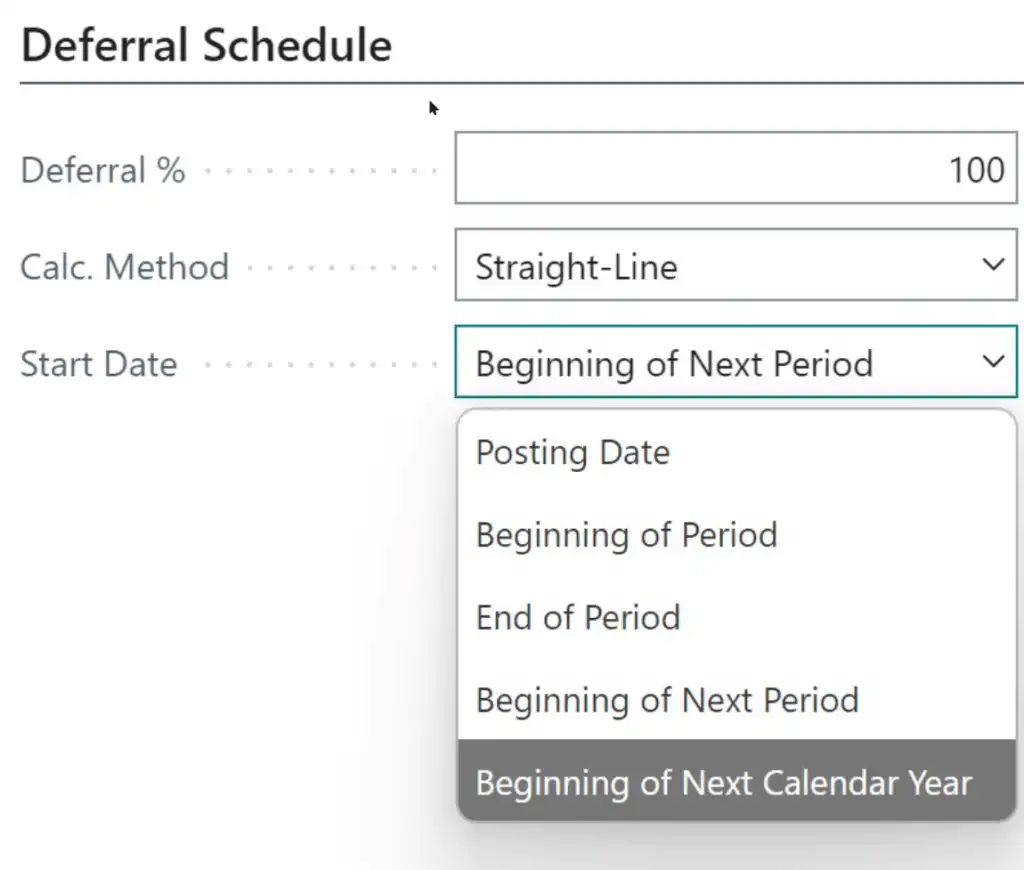
In addition to the new fields described above, there is an additional option available in the deferral processing.
The new option allows you to record the deferral starting at the beginning of the next calendar year.
5. Standard Dimensions by Location
Business Value
Dimensions are analytical values that can be used to provide additional information for posted entries, allowing you to track and analyze them in documents; by using analytical dimensions, operational data can be reflected in accounting information.
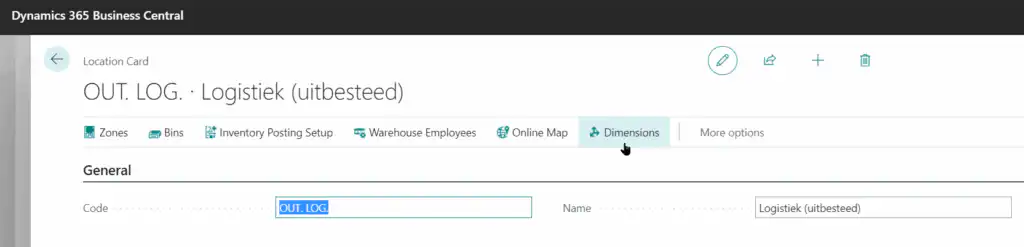
Dimensions can, for example, indicate which department or project a transaction comes from. This new feature makes it possible to link dimensions to logistics warehouses (Locations).
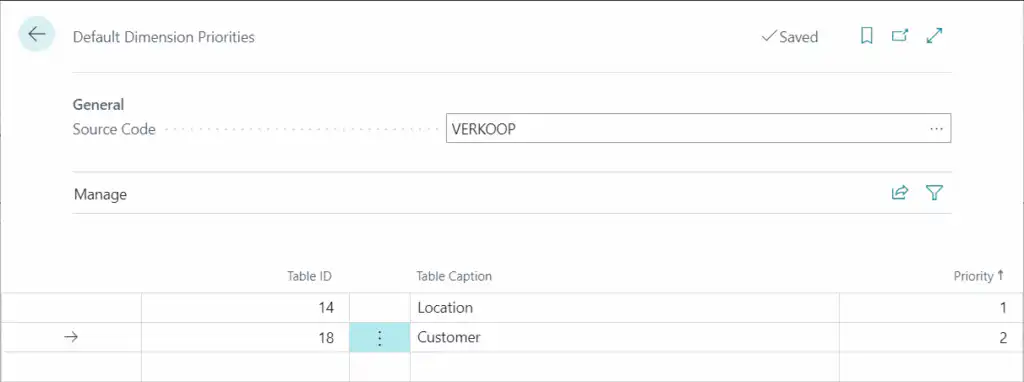
Using the existing Dimension Priorities feature, you can also specify which master data entries take precedence: if the same REGION dimension is configured for both a customer and a Branch, you can determine which REGION is included in the posting rule for accounting processing.
Setup
Select the standard dimensions for a Branch using the button Dimensions (Dimensions).
Usage
Business Central's posting processes will process the data from the provided Master Data according to the configured priorities.
The example shown here will ensure that, in sales documents, the dimensions of the Branch take precedence over the customer's dimensions.
6. Opening and Sharing Multiple Documents in Batch
Business Value
The status Open and Released The status of a sales document determines whether that document is eligible for further processing. Specifically: a warehouse shipment can only be created for Released orders.
Organizations that want to release large numbers of orders at once—thereby making them available for processing in the warehouse—often have to edit these documents one by one.
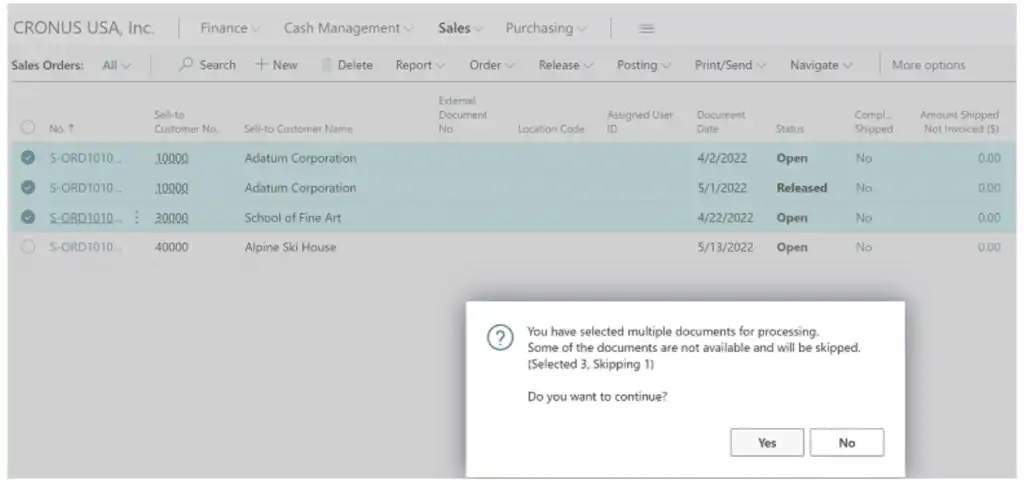
This new feature makes it possible to process multiple documents at once.
If orders require approval before they can be released, this approval can also be requested in batches.
Setup
No setup required.
Usage
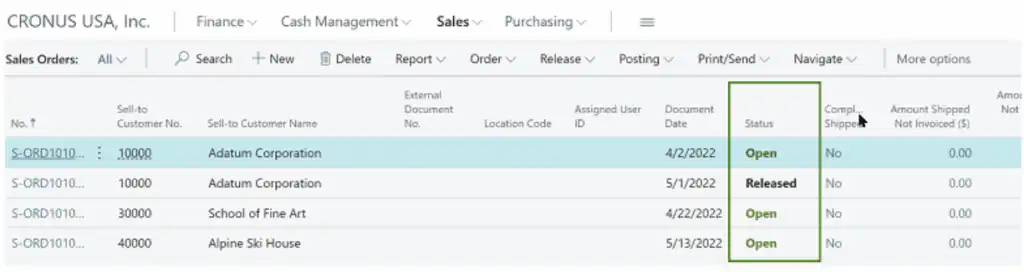
To view documents that Open or Released are easier to identify, especially when displayed in a list of documents; the statuses Open and Released different font colors.
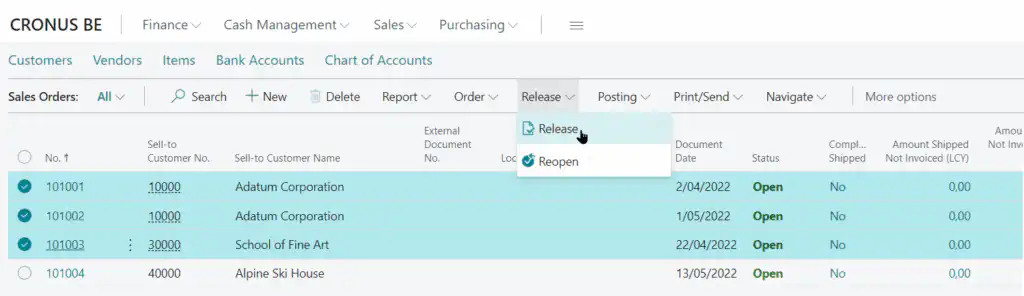
When you release or reopen multiple documents, a confirmation message displays the number of selected documents and the number that remain unchanged.
During the process of releasing and reopening documents, the progress is displayed, and if there are any errors, they are shown on the Error Messages page.
7. Job queue entries for Delegated Admins
Business Value
Microsoft partners use the Delegated Admin role to configure and manage certain aspects of Business Central on behalf of their customers.
However, the role is limited in some respects. In previous release waves, one of these limitations was the ability to create job queues for tasks and use them as Ready to use to set up for customers.
The job queue is an important tool for setting up and configuring companies in Business Central. With this update, delegated administrators can create job queue tasks and request approval from a licensed user.
Setup
No setup required
Usage
For partners, not for end customers.
Not yet released…
Inventory and Warehouse Picks for Projects
Business Value
Logistics settings can be configured to enforce the use of picking instructions. Until now, picks were only available for sales documents.
Starting with Business Central 20, picks can also be created for use in Projects.
Please note: The picking instructions are only instructions for retrieving the goods from the warehouse; creating the pick does not yet record actual consumption on the project. Actual consumption is not recorded on the project until the pick is either posted (stock pick) or registered (warehouse pick).
Setup
Not yet released; can be enabled as a feature in Business Central 20.
Shopify Connector
Business Value
Microsoft Dynamics 365 Business Central integrates with Shopify to help our customers create a better online shopping experience.
Shopify offers e-commerce businesses a user-friendly solution, and Dynamics 365 Business Central provides comprehensive business management for finance, sales, service, and operations teams in a single application.
The new out-of-the-box integration between Business Central and Shopify synchronizes order, inventory, and customer information to ensure that orders can be processed faster and customers are better served.
This joint effort supports Business Central’s mission to connect data to help companies adapt more quickly, work smarter, and perform better.
Please note: The Shopify connector is only available in SaaS; it is not available for on-premise installations.


