

When implementing various solutions, we often find that customers want to create all their reports in Power BI. The tool is popular and well-known, but is it really the right choice in every situation? Often, when using SQL Server or Analysis Services, a Reporting Services license is also available. This tool is frequently overlooked, but is that really justified?
Reporting vs. Analysis
When we look at these two tools, Power BI’s strength lies in its ability to perform quick analyses and easily compare data from different perspectives. A dashboard can be set up quickly and is highly interactive. However, when building a large report, you’ll quickly run into the limitations of the canvas and the limited options in terms of visuals and functionality.
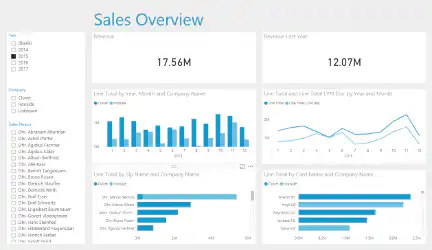
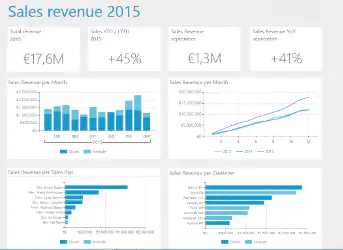
Reporting Services is often seen as a “list-based tool,” but it can also be used to create very attractive dashboards. The dashboard below was built in Reporting Services and contains the same data and look and feel as the dashboard in Power BI. While its interactivity is more limited, Reporting Services is more powerful in a number of other ways.
Functionality
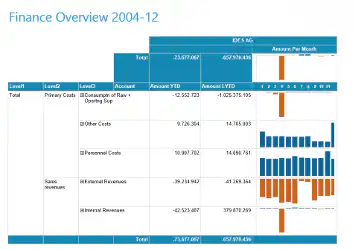
While it’s very intuitive to quickly set up a dashboard in Power BI, it takes a little more time with Reporting Services. On the other hand, there’s much more functionality available when designing reports. Here are a few examples:
- Visuals can be positioned with great precision
- Using Subreports / Detail Reports
- Using Charts in Tables
- Functionality is programmable
- Security is more practical
- Data entry is possible
Distribution
Within Power BI, distribution options are limited to exporting to PDF in the desktop application and printing a dashboard via the Power BI cloud. While you can set up alerts, it’s not possible to distribute items such as customer reports. An SSRS report, on the other hand, can be scheduled and sent in various formats through the portal. Additionally, with data-driven subscriptions, you can specify exactly when, to whom, and with what data a report is sent.
Roadmap
Updates for Power BI are released very frequently, whereas updates for Reporting Services are relatively infrequent. This does not mean the end of Reporting Services. Microsoft has announced that it plans to integrate both tools more closely. This is already evident, for example, in Power BI Report Server. According to Microsoft, functionality should not, in principle, be a deciding factor when choosing between an on-premises, cloud, or hybrid reporting solution. The functionality should be the same, so even so-called paginated reports from Reporting Services will be offered via a cloud solution.
Conclusion
Within the Microsoft BI stack, there is no “best” tool for designing dashboards and reports. Both Power BI and Reporting Services can be valuable within an organization, provided they are used correctly. With the introduction of Power BI Report Server, both tools are even seamlessly integrated into a single portal. Users can then access reports and dashboards developed in either Power BI or Reporting Services through a single portal. This does not even require a local installation of Power BI.


