

How secure is our data in Microsoft Dynamics 365 and Power Platform? Where are they stored? Who has access to them? In this blog post, we answer these frequently asked questions from our customers.
Microsoft Dynamics 365 and Power Platform were built on the Azure cloud platform and integrate with the built-in security model of it. This robust security model ensures that your data is secure, that backups are created, and that everything complies with data regulations.
In addition to universal security tools and features, Microsoft offers a range of additional configurable security layers. For example, Microsoft has introduced additional layers of security through encryption and authentication, as well as additional security roles and permissions for accessing data in Dynamics 365 and the Power Platform.
The physical location where Microsoft stores your data
Microsoft has a global network of more than 200 data centers spread across 34 countries. These Microsoft Azure data centers comply with strict and advanced security and reliability requirements. Your data in Microsoft Dynamics 365 and Power Platform is also managed in an Azure data center. Precisely because these data centers must meet strict security requirements, the level of security is much higher than what you could provide yourself with an on-premises environment.
As a customer, you have control over your data and can choose which regional data center you want to store your data in. Your data remains your property and is managed by you. You can trust that your data is stored and secured in a safe place.
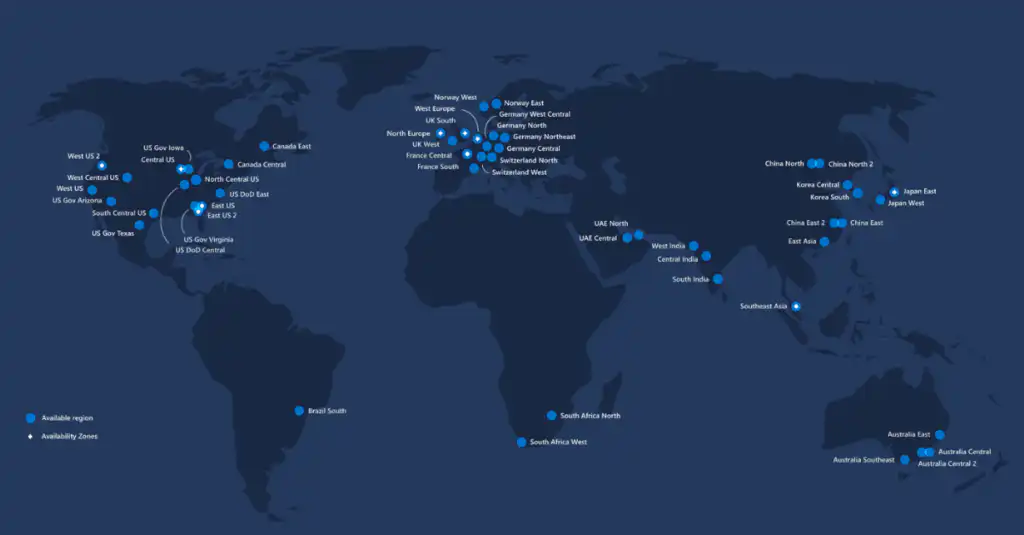
In May 2021, Microsoft began new plan “EU Data Boundary for the Microsoft Cloud” to store and process all data from European customers within the European Union. This will apply to all European Azure, Microsoft 365, and Dynamics 365 customers.
Microsoft is the first major cloud provider to announce such a plan and expects to have implemented all the necessary technical changes by the end of 2022.
#wistudat: Microsoft has 14 regions with data centers in Europe: Ireland, Paris, Middenmeer, Marseille, London, Cardiff, Frankfurt, Magdeburg, Berlin, Zurich, Geneva, Stavanger, and Oslo.
Security Model in Dynamics 365 & Power Platform
In general, Dynamics 365 and Power Platform follow the same architecture as the Azure security platform. This platform consists of several layers of protection:
- encryption
- secure virtual network gateway
- maintenance logs
- Malware Protection and Threat Detection
- Access control through authentication and authorization mechanisms
Below, we explain these three layers of protection in more detail.
1. Encryption
Microsoft uses encryption technology to encrypt customer data in Dynamics 365 and Power Platform so that others cannot easily read it. By default, for Dynamics 365 and Power Platform apps, the SQL Server Cell-Level Encryption Used for a set of standard fields on certain standard entities (tables) that contain sensitive information, such as usernames and email passwords.
2. Access Control Through Authentication
Only verified users with permissions for Dynamics 365 and Power Platform can establish a connection. Dynamics 365 and Power Platform use Microsoft Azure Active Directory (Azure AD) to identify users. Azure Active Directory provides single sign-on, conditional access, and multi-factor authentication.
One of the verification steps that Microsoft uses is the Multi-Factor Authentication (MFA), a two-step verification method and, therefore, an excellent way to secure access to your applications. Once activated, this requires users to provide additional forms of authentication to complete a login, such as a code sent via text message to the user's phone. It is generally believed that enabling MFA options blocks 99.9% of automated cyberattacks.
3. Access Control Through Authorization
In Dynamics 365 and Power Platform, you can also configure security roles and permissions to grant users access.
A security role determines how different types of records are accessible to a specific category of users, such as salespeople, marketers, managers, etc. You can manage access to data in Dynamics 365 by modifying existing security roles, creating new security roles, or assigning users a different security role. Users can also have multiple security roles.
Permissions are, in turn, the detailed access rights assigned to various security roles. You can set specific access rights for data and ensure that users only have access to data when necessary. This helps limit unnecessary and improper use of data, thereby ensuring greater data confidentiality.
Each security role consists of Powers at a record high (1) and task-based competencies (2).
- (1) Record-level permissions determine which actions a user with access to the record can perform, such as Read, Create, Delete, Write, Assign, Share, Add, and Add to.
- (2) Task-based permissions grant a user the ability to perform specific tasks, such as publishing knowledge articles.
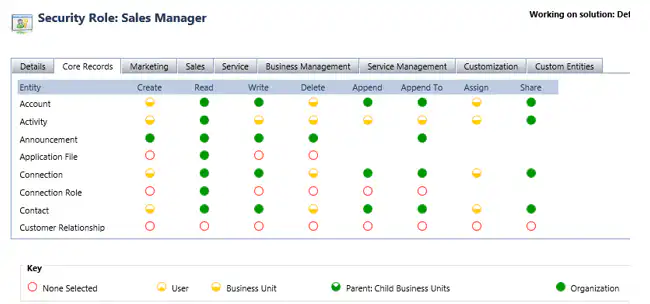
Different Categories of Security Roles
Every Dynamics 365 and Power Platform user must therefore have a security role to sign in. There are various categories that determine what a user can access based on their security role.
- Business units: A business unit is a component of an organization and allows for a uniform level of security to be established for everyone within that part of the organizational structure. Business units can be used to organize departments by geographic location, type of business function, product or service, target audience, or market.0
- Role-Based Security: A set of permissions assigned to a user based on the user's job responsibilities.
- Teams: A group of users; everyone on that team is assigned to the security role. The user inherits the team's permissions as long as they are a member of the team.
- Hierarchy Security: access rights for users based on their position in the corporate hierarchy.
- Record-based security: entity security and what actions users or teams can take on individual records.
Conclusion
The effectiveness of a security model depends largely on proper implementation. The Dynamics 365 and Power Platform security model provides the necessary features to build a robust and secure platform. But first and foremost, you need to refine the various user roles within your organization to tailor the implementation of the security model to your needs. Get expert help from Alistar.


