

If your software doesn't work together, how can your people?
If you use business software tools that don't integrate with each other, you're missing out on many opportunities to to work more productively and smarter (together).
- What if … your CRM system and email software aren't integrated?
- What if … your CRM software doesn't allow you to generate documents based on your data?
- What if … you want to export and import data from CRM?
- What if … you could make it easier for colleagues to communicate with each other?
1. What if … your CRM system and email software aren't integrated?
To track emails in CRM, your employees must first save the email locally and then upload it to CRM. This is so cumbersome and complex, that very few of your employees will bother with this. As a result, far too few emails are tracked in the CRM, meaning the complete contact history is missing. If you ensure that your CRM environment integrates with your email software, Then, with a single click, you can track an email in CRM. In addition, CRM automatically links an email message to each contact– or lead-record based on the matching email address.
Microsoft Outlook + Dynamics 365
The dedicated Dynamics 365 app for Outlook ensures that Microsoft Outlook and Dynamics 365 ‘talk’ to each other.
- Link Outlook emails, meetings, and appointments to a Dynamics 365 record with a single click.
- View information about contacts and potential customers from Dynamics 365 while working in Outlook.
- Open Dynamics 365 records directly from an Outlook email to find or enter more detailed information.
- Create Dynamics 365 records and actions (phone call, task, or appointment) directly from any email.
- Add email templates, knowledge articles, or sales documentation from Dynamics 365 when you compose an email or schedule an appointment.
- Keep your Outlook contacts up to date in Dynamics 365.
2. What if … your CRM software doesn’t allow you to generate documents based on your data?
Then employees retrieve data from the CRM “copy and paste” to documents. That’s not a good idea, because that way several inconsistent versions are created. For example, an employee manually prepares a quote, lowers the sales price directly in the quote document itself, and, out of absent-mindedness, forgets to Quote-change the record in CRM. If you then issue an invoice from CRM, the customer will receive an invoice for a higher amount than what was stated in the signed quote. Can you imagine how your customer will react?
Microsoft Word + Dynamics 365
Dynamics 365 integrates seamlessly with Microsoft Word. First, create a Word template in your company’s house style, and then import it into your Dynamics 365 application. You can then generate a standard document from a Dynamics 365 record with the correct personalized information. This ensures you always send professionally formatted documents (e.g., purchase orders, invoices, contracts, etc.) to your customers in a consistent manner.
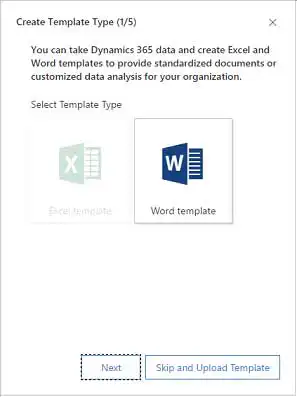
If you do automatically generate documents from the CRM, but there is no integration with document management software, then it is It's a hassle to manage the generated documents centrally and in a structured way to save. If your employees have to manually place documents in the correct location, there is a good chance they won't do so consistently, which can make it difficult to find documents at times.
Microsoft SharePoint + Dynamics 365
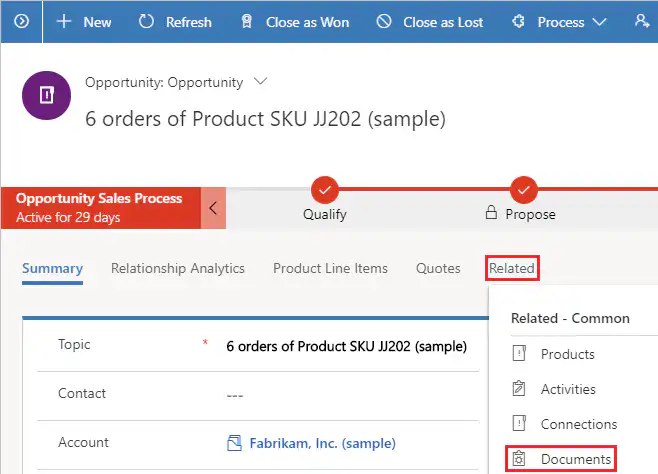
Therefore, use SharePoint's document management capabilities with Dynamics 365. Thanks to the integration of Microsoft Dynamics 365 with Word and SharePoint, it is easy to automatically save generated Word documents in a SharePoint folder linked to the corresponding CRM record.
Quotes, proposals, project plans, and other documents in SharePoint can also be opened directly from the Dynamics 365 interface. This allows you and your colleagues to access all important documents related to a specific customer directly from Dynamics 365. This not only simplifies document management but also saves valuable CRM database space.
3. What if … you want to export and import data from the CRM?
Sometimes it can be useful to export CRM data to Excel—for example, to perform quick data analyses or to edit large numbers of CRM records. This can be a serious challenge if your CRM tool isn't integrated with office software.
Microsoft Excel + Dynamics 365
- Use the following from Dynamics 365: “Export to Excel” button to export CRM data to a static or dynamic Excel file or to a PivotTable. If you export data to a dynamic Excel file or a PivotTable, the data remains linked to Dynamics 365, so your reports are updated dynamically. And because the data comes from Dynamics 365, security roles are also maintained.
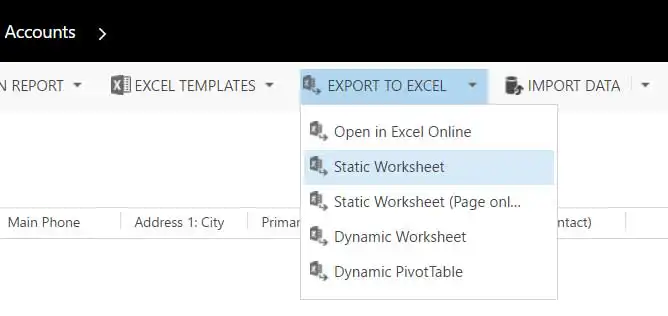
- Please choose “Open in Excel Online”, you’ll be working in a familiar Excel file right within Dynamics 365. As a sales manager, for example, you can open pending opportunities in Excel Online and, say, perform a “what-if” analysis of various incentive scenarios for your sales team.
- To import Excel data into Dynamics 365—such as Excel files containing contacts, leads, and accounts—download the specific “Data Import Templates” from Dynamics 365.
4. What if … it could make communication among coworkers easier?
Working smarter also means ensuring that everyone on a team—regardless of where they are or what device they're using—can easily participate in the discussions that matter to the team.
Microsoft Teams + Dynamics 365
Thanks to the seamless integration between Microsoft Teams and Dynamics 365, you can easily collaborate with colleagues remotely on projects such as a quote or a sales opportunity.
- Link individual Dynamics 365 records to Team Channels to enhance collaboration between accounts, deals, and projects.
- Hold meetings, chat, and make calls from your Dynamics 365 workspace without having to switch to Microsoft Teams.
- Safely access records and business processes in Dynamics 365 while working in Teams.
- Easily find information on the go and access records with the Dynamics 365 bot for Microsoft Teams.
Conclusion: Better together!
When you connect Dynamics 365 and Microsoft Office 365, you bring people and processes together, work smarter and more productively, and immediately deliver much better customer experiences. It’s a win-win!


