
Copilot in Microsoft Dynamics 365 Business Central is an AI assistant that helps users work faster and more easily in Business Central. Copilot works alongside the user and supports daily tasks with suggestions, analyses, and AI-driven assistance.
For example, using Copilot Chat, you can search for information and company data using natural language, navigate more quickly to relevant records, and get explanations about fields, processes, and features within Business Central.


Copilot in Business Central is the umbrella term for AI assistance integrated into Business Central. In addition to Chat, this includes features such as Analysis Assist, Summarize, and Autofill.
Copilot Chat
Copilot Chat in Business Central is a specific Copilot feature. It allows you to ask questions in natural language to find business data or to understand how Business Central works. Chat can find relevant records, provide links to details, and explain fields, processes, and features, including add-on apps.
For example, Copilot Chat can be used to:
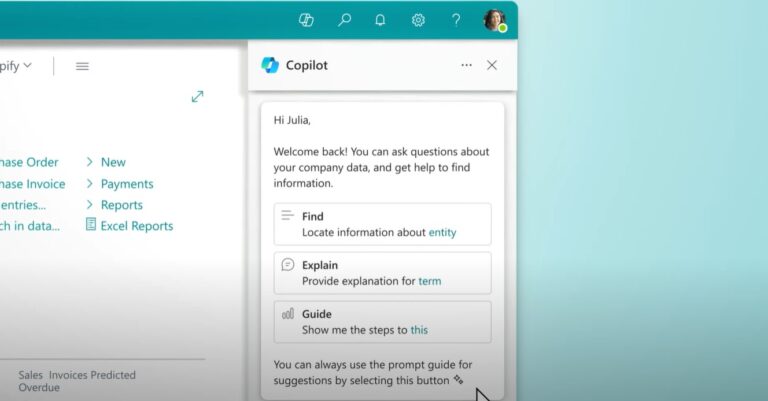
Discover how Copilot Chat can help you in Business Central.
Users can search for relevant data and records in Business Central using everyday language.
Employees can ask questions about fields, processes, and features when they aren't sure exactly how something works in Business Central.
Instead of navigating through various pages and records on their own, users can describe what they're looking for directly from the chat.
Copilot Chat can also answer questions about features in add-on apps and customizations within Business Central.
Organizations often pursue multiple initiatives in parallel, each with its own level of maturity and pace: a Copilot rollout on the shop floor, experiments with AI agents within departments, and custom development for specific business processes.
A successful AI approach starts with a strong foundation.
We build intelligent agents that integrate directly with core processes within the organization.
We create advanced, customized AI solutions and develop innovative applications that go beyond standard use cases.
AI in Business Central helps organizations speed up processes, analyze data more effectively, and reduce repetitive tasks. To achieve this, Microsoft integrates Copilot features and AI agents directly into the ERP system, enabling users to work faster without relying on external AI tools.
AI in Business Central supports employees in their daily tasks, such as analysis, reporting, order processing, financial processes, and finding information. In addition, AI agents can partially or fully automate certain processes, reducing manual work and giving employees more time for tasks with higher added value.
Copilot supports users in their work by answering questions, performing analyses, making suggestions, and summarizing information. AI agents go a step further: they can independently carry out tasks and processes within predefined limits, while an employee monitors the process and provides approval when necessary.
Microsoft is introducing several AI agents for Business Central, including the Sales Order Agent, Payables Agent, and Expense Agent. These agents help organizations automate processes such as sales orders, incoming invoices, and expense reports.
Yes. The Sales Order Agent can analyze incoming orders and prepare or create sales orders. This reduces the need for manual data entry and allows orders to be processed more quickly. Employees retain control over the process.
Yes. The Payables Agent supports the processing of supplier invoices by recognizing data, linking invoices to suppliers, and preparing posting proposals. This helps finance teams work faster and more efficiently.
Many organizations use AI in Business Central to reduce manual work, speed up processes, minimize errors, and increase employee productivity. Automating routine tasks frees up time for analysis, customer interaction, and strategic work.