

Microsoft Dynamics Marketing and Microsoft Dynamics CRM are two separate applications that work with the free “Microsoft Dynamics Marketing Connector for Microsoft Dynamics CRM”can be linked together. Essentially, the “Connector” synchronizes data between the two applications in real time. (There is only a delay of a few seconds between the applications.).
This connector is available for CRM Online and CRM On-Premises environments (*) (IFD is not required, which is good news for corporate networks with security requirements that do not allow web access to CRM). Of course, it’s always possible to set up a custom data integration if you have specific requirements, but if you want to quickly set up synchronization between Microsoft Dynamics Marketing and CRM, the existing connector is an excellent option.
More specifically, both applications exchange data of the following entity types:
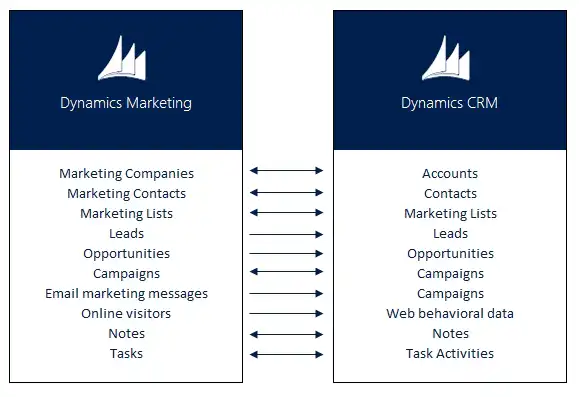
Microsoft Dynamics Marketing and CRM: The Perfect Pair
Microsoft Dynamics Marketing is primarily used for lead generation. Microsoft Dynamics CRM is the ideal application for qualifying leads. Using the connector, you can synchronize leads generated and received in Microsoft Dynamics Marketing with Microsoft Dynamics CRM. From there, you can assign them to your sales representatives to qualify the leads. To increase the “sales readiness” of the generated leads, you can use lead nurturing and lead scoring to separate the wheat from the chaff. (See also: The Value of Leads in CRM.)
The Microsoft Dynamics Marketing Connector must be installed and configured by a technical administrator of the system. The connector provides a default mapping of entity types and fields based on a typical business scenario. Of course, you can review your specific requirements regarding synchronization and adjust the default settings. A technical administrator can configure the conditions for each entity type that trigger an update from Microsoft Dynamics Marketing to Microsoft Dynamics CRM.
Please note that after the synchronization is set up, the connector performs an initial synchronization during which all existing data is exchanged between the two systems. Depending on the amount of data in your system, the initial synchronization may take some time and consume system resources. That’s why it’s best not to run it during peak hours. After that, synchronization proceeds automatically and incrementally.
(*) The Microsoft Dynamics Marketing Connector requires at least Microsoft Dynamics CRM 2011 Update Rollup 12 for an on-premises environment, or at least the Microsoft Dynamics CRM December 2012 Service Update for an online environment.


