

Identifying Target Audiences is at the heart of every successful marketing strategy. How exactly do you go about this? In this blog post, we discuss a number of guidelines that can help you put together target groups in Microsoft Dynamics 365.
How do you define target audiences in Microsoft Dynamics 365?
First and foremost, you determine your company’s or business’s position in the market and then define your target audience(s).
To define target groups, divide the market into segments. Specifically, you do this in Microsoft Dynamics 365 by using. selection criteria (1).
Once you have determined all the relevant selection criteria, Add these parameters to your CRM database (2). You can then use these parameters to target audience lists (3) to create so that you can communicate effectively in marketing campaigns.
1. Segmentation Based on Selection Criteria
Here are a few examples of common selection criteria.
If your (potential) customers are businesses (B2B):
1. Company Size/Revenue
- Number of employees
- Estimated Potential Customer Value
- Revenue for a specific period (last year, most recent year, year to date)
- Total revenue of the company
- Current Effective Customer Value for Existing Customers
2. Risk Category
- Creditworthiness
- Payment Habits
3. Business Sector
- Classification by Industry Sector
- Description of Business Activities
4. Location
- Address Information
- Classification by sales territory
- Regional Growth Factors
If your (potential) customers are consumers (B2C):
1. Geographically
- Address Information
- Country, region
2. Demographic
- Gender
- Age
- Family Composition
3. Socioeconomic
- Income
- Occupation
- Level of Education
Tip: For both B2B and B2C customers, it’s also best to create selection criteria based on level of interest and behavior.
As for the level of interest, you can use. lead scoring determine to what extent a business or consumer is already interested in your products or services. The higher the score, the greater the interest and the higher the likelihood of a purchase. For more information on lead scoring, see this blog post.
2. Add selection parameters to your CRM database
Microsoft Dynamics 365
In Microsoft Dynamics 365 contains all the information about your (potential) customers (accounts) and contacts (contacts). The quality of your customer data is extremely important for creating effective target audience lists (“garbage in, garbage out”(“principle”). Keeping your customer data up to date at all times is a task that should not be underestimated. Still, it’s always worth investing in the quality of your database.
Tip: Keep your business data in Microsoft Dynamics 365 automatically up to date through data integration with an external database, such as Trends Top, Graydon, VKBO (Enriched Cross-Reference Database of Enterprises), etc. .
Add Selection Parameters
There are two ways to add your specific selection criteria in Microsoft Dynamics 365:
1. Directly on the form from the account or contact
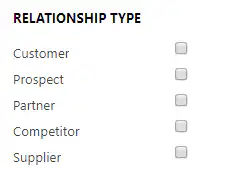
This is done using a series of checkboxes, drop-down lists, and lookup fields.
For example:
- Classification by profile on the contactform (store manager, sales director, marketing director, …)
- Specifying the relationship type using a set of checkboxes (YES/NO) on the accountform (is a customer, is a supplier, is a prospect, …)
2. Through a related intermediate entity (linked to account/contact records)
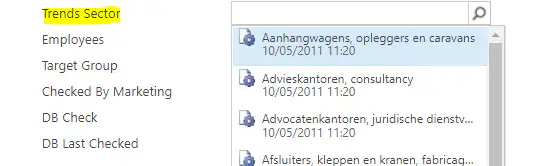
This is done by means of records that you add to your account- or contactis tied to forms (see “tagging“).
For example:
- Interests, preferences on contact
- Business activities or sectors in account
Tip: Companies often have a general email address. All too often, these inboxes are flooded with spam emails, and on top of that, you can’t be 100% sure who’s actually reading them. To ensure your message is received properly, it’s best to send it directly to the relevant contacts within the company. To do this, you need to profile for each contact. We recommend using a limited number of profile categories. It’s best to use a predefined list of profiles from which to select. In addition, you can track which department the person is in (e.g., management, sales, marketing, service, IT, etc.). This makes it possible to unambiguously select a profile that meets the selection criteria.
3. Compile target audience lists
To create target groups in Microsoft Dynamics 365, use marketing lists
You can Account, Contact or Lead records add to a marketing list. Only one type can be added to a single marketing list. Therefore, it is not possible to have more than one type in the same list accounts and Add contacts.
Suppose you want to send a message in certain campaigns to account and contact records, you can do this by Link multiple marketing lists to a campaign. To do this, create two separate lists: one for accounts and 1 for contacts.
Which type of marketing list should I use?
In Microsoft Dynamics 365, you can choose between a static or dynamic list.
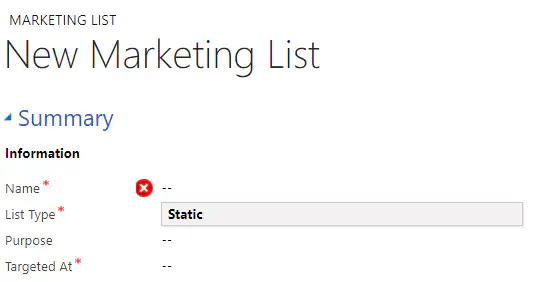
A static list please manually updated. Using the ‘Advanced Search’ in Microsoft Dynamics 365, you add the search results to the list and evaluate them. The latter means that you use a search query to determine which members still meet certain selection criteria. With ‘Advanced Search’This makes it easy to add or remove records from static lists.".
A dynamic list is based on a search query that includes your selection criteria. When you open a dynamic list, Microsoft Dynamics 365 will dynamically retrieve the results. You only need to maintain the database; Microsoft Dynamics 365 continuously updates the list and automatically updated based on the selected criteria. To make the most of a dynamic marketing list, it’s therefore crucial to ensure that your customer data is complete. If you don’t keep this in mind, you’ll miss customers in your list—and, as a result, opportunities.


